When an IBM Planning Analytics (TM1) cube takes forty seconds to open a dashboard view, overfeeding is the culprit nine times out of ten. If you want your rolling forecast models to calculate instantly without exhausting server memory, you must feed only the exact leaf cells that hold values—not the entire dimensionality of your cube.
The Silent Killer of TM1 Server Performance
Every TM1 developer knows the panic of budget season.
The finance team opens their Planning Analytics Workspace (PAW) books on Monday morning. Sixty financial analysts start inputting headcount and revenue numbers at the same time.
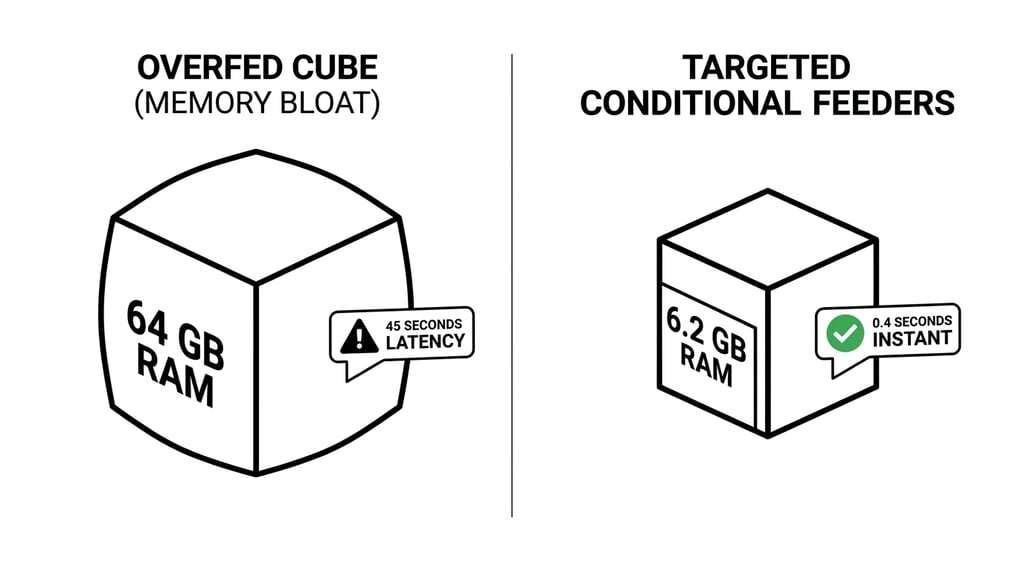
Suddenly, the TM1 server locks up. Memory consumption spikes from 8 gigabytes to 64 gigabytes. View refresh times jump from 0.4 seconds to 35 seconds.
Your infrastructure team suggests throwing more RAM at the virtual machine.
That will not fix the problem.
RAM is rarely the bottleneck in IBM Planning Analytics. The bottleneck is the mathematical explosion of fed cells created by poorly scoped calculation rules.
How Sparse Consolidation Works (And Why Feeders Exist)
To fix calculation lag, you must understand how the TM1 in-memory engine handles empty space.
Multidimensional planning cubes are naturally sparse. In an eight-dimensional enterprise P&L cube, 99% of potential cell intersections are empty.
When you write:
SKIPCHECK;
You instruct the TM1 engine to skip empty cells during consolidation. This is what gives TM1 its speed. Instead of scanning billions of empty intersections, it reads only populated cells.
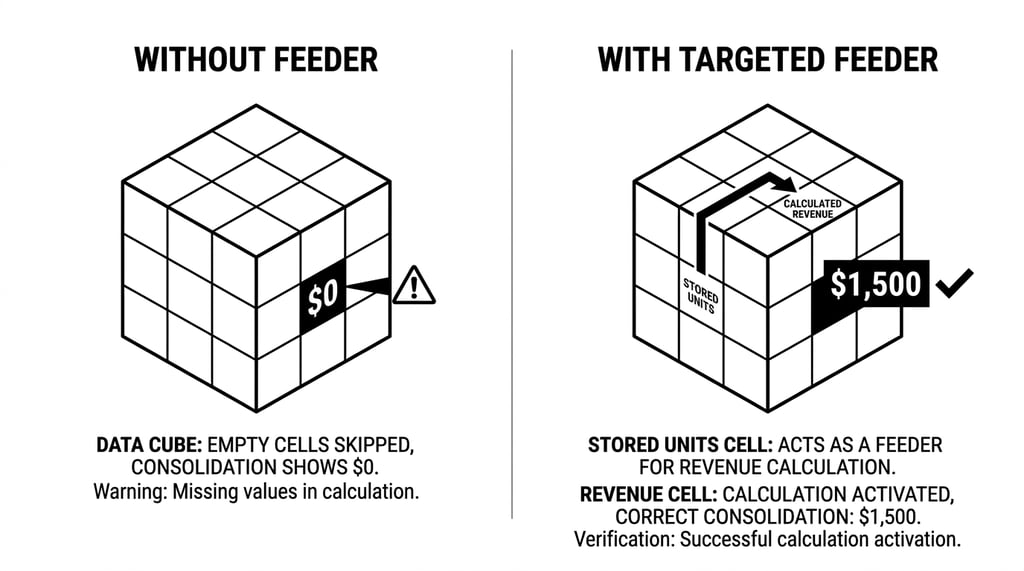
However, rules change the rules. When a calculation rule computes a value dynamically (for example, multiplying Units by Price), TM1 does not know that cell has a value unless you set a feeder flag.
[Stored Leaf Cell: Units] → (Feeder Arrow) → [Rule Calculated Cell: Revenue]
Feeders do not calculate numbers. Feeders set an internal 1-bit memory flag that tells the consolidation engine: "Look here when rolling up totals."
When you feed correctly, TM1 remains fast. When you overfeed, you force TM1 to treat millions of empty cells as active data points.
The Overfeeding Comparison Matrix
The difference between a poorly fed model and an optimized model is night and day:
| Performance Factor |
Overfed Cube Architecture |
Targeted Conditional Feeder Architecture |
| Fed to Populated Cell Ratio |
250:1 (Excessive overfeeding) |
< 5:1 (Tight mathematical precision) |
| Server Memory Footprint |
48 GB RAM |
6.2 GB RAM |
| Server Startup / Load Time |
18 minutes |
45 seconds |
| PAW View Refresh Latency |
22–45 seconds |
0.3–0.8 seconds |
| Concurrent User Capacity |
Max 15 active users before lockups |
150+ active concurrent users |
The 3 Most Common Feeder Traps
Let us look at the three architectural mistakes that cause 90% of TM1 overfeeding.
1. Feeding from a Rule Calculation Instead of Stored Leaf Data
Never feed a target cube from a rule-derived value if you can feed from the underlying stored input.
# INCORRECT: Feeding from a calculated measure
['Gross_Margin'] => DB('Reporting_Cube', !Version, !Year, !Period, !Entity, 'Margin');

# CORRECT: Feed directly from stored Sales and Cost inputs
['Units_Sold'] => DB('Reporting_Cube', !Version, !Year, !Period, !Entity, 'Margin');
When you feed from a calculated rule cell, TM1 cannot always determine if the source cell is populated without evaluating the entire rule tree. Feeding from raw leaf inputs guarantees that only real transactions trigger the feeder.
2. Feeding Consolidated Elements
Feeding a consolidated element feeds every single leaf descendant underneath that hierarchy.
If your All_Products consolidation contains 15,000 SKUs across 200 stores and 36 periods, writing a single feeder to All_Products generates over 108 million fed cells.
Never write consolidated elements on the right-hand side of a feeder statement without strict element mapping.
3. Static Feeders in Rolling Forecasts
In a rolling forecast, actuals exist for closed months, while forecast numbers exist only for future months.
A common developer mistake is feeding all 12 forecast months across all active accounts regardless of status. This feeds months that have zero forecast inputs, blowing out memory.
The Fix: Conditional Feeders & 2D Control Cubes
The cleanest way to eliminate rolling forecast overfeeding is to use a lightweight 2-dimensional Control Cube (Control_Feeder_Flags).
Step 1: Create the Control Cube
Create a cube with two dimensions: Year and Period. Populate it with binary flags (1 or 0) indicating active forecast periods.
Step 2: Implement Conditional Feeder Logic
In your main calculation rule, write your feeder using a conditional DB() lookup:
SKIPCHECK;

# CALCULATION RULE: Calculate Revenue for active forecast periods only
['Forecast_Revenue'] = N:
    IF(DB('Control_Feeder_Flags', !Year, !Period, 'Is_Active_Forecast') == 1,
        ['Units'] * ['Price'],
        0
    );

FEEDERS;

# TARGETED CONDITIONAL FEEDER: Feed only when flag is active
['Units'] => DB(
    IF(DB('Control_Feeder_Flags', !Year, !Period, 'Is_Active_Forecast') == 1,
        'Revenue_Cube',
        ''
    ),
    !Version,
    !Year,
    !Period,
    !Entity,
    !Product,
    'Forecast_Revenue'
);
When the IF condition evaluates to false, the cube name string returns empty ''. TM1 suppresses the feeder entirely, saving millions of unnecessary index flags.
Diagnostic Script: Measuring Feeder Efficiency
How do you know if your cube is overfed right now?
Add the following TurboIntegrator process to audit your fed-to-populated cell ratio using TM1 performance statistics:
# PROLOG TAB: Enable Performance Monitoring Stats
ExecuteCommand('tm1s.cfg -Update PerfMonActive=T', 0);

cStatsCube = '}StatsByCube';
cTargetCube = 'Revenue_Cube';

# DATA TAB: Read Stored vs Fed Cell Metrics
nPopulatedCells = CellGetN(cStatsCube, cTargetCube, 'Number of Populated Numeric Cells');
nFedCells = CellGetN(cStatsCube, cTargetCube, 'Number of Fed Cells');
nMemoryUsedMB = CellGetN(cStatsCube, cTargetCube, 'Memory Used for Views') / (1024 * 1024);

IF(nPopulatedCells > 0);
    nFeederRatio = nFedCells / nPopulatedCells;
ELSE;
    nFeederRatio = 0;
ENDIF;

# Write audit output to log file
sLogMsg = 'CUBE: ' | cTargetCube | ' | POPULATED: ' | NumberToString(nPopulatedCells) |
          ' | FED: ' | NumberToString(nFedCells) | ' | RATIO: ' | NumberToString(nFeederRatio) |
          ' | MEMORY_MB: ' | NumberToString(nMemoryUsedMB);

LogOutput('INFO', sLogMsg);

# Alert if ratio exceeds safe boundary
IF(nFeederRatio > 15.0);
    LogOutput('WARN', 'CRITICAL OVERFEEDING DETECTED: Ratio exceeds 15:1 limit.');
ENDIF;
If your nFeederRatio is above 10:1, your model is suffering from overfeeding and is a prime candidate for feeder refactoring.
The 4-Step Remediation Plan
If your enterprise TM1 model is running slow today, follow this remediation sequence:
[Step 1: Quantify the Ratio] Run }StatsByCube audit to identify the specific cubes with Feeder Ratios > 10:1.
[Step 2: Trace Feeder Links] Use PAW "Trace Feeders" on high-level consolidated cells to find runaway feeder branches.
[Step 3: Replace Static with Conditional Feeders] Introduce 2D control cubes to restrict feeder execution to active planning periods.
[Step 4: Execute CubeProcessFeeders] Trigger CubeProcessFeeders during off-peak windows to rebuild clean memory structures.
About Octane Software Solutions
Octane Software Solutions is an IBM Platinum Business Partner specializing in IBM Planning Analytics (TM1) performance tuning, cloud migrations, and enterprise FP&A modeling.
Our TM1 Flight Check diagnostic audits your cube architecture, feeder efficiency, and rule hierarchies to restore sub-second response times across your financial reporting systems.


 0
0
 25 August 2026, 11:33:09 am AEST
 7 min
7 min


 print
print


.png)
Leave a comment