.png)
.webp) 0
0
.webp) 6 November 2026, 11:30:00 am AEDT
6 November 2026, 11:30:00 am AEDT
.webp) 7 min
7 min
Hiring the right person is one of the most important things a business does. It’s also one of the slowest. A single role can attract hundreds of applications. Recruiters spend days screening resumes, chasing calendars and writing up interview notes. Good candidates accept other offers while they wait.
Octane has built an AI hiring solution on IBM watsonx Orchestrate that takes a role from resume to recommendation, with a person making every hiring decision.
This article explains how it works, how it keeps hiring fair, and what changes for an HR team that uses it.
The business challenge
The pressure on talent teams is constant. Volumes are high, and every candidate deserves a fair look. Screening is repetitive, but it can’t be careless. Scheduling interviews means endless back and forth. Interview notes vary from one interviewer to the next, which makes candidates hard to compare.
Then there’s fairness. Hiring decisions have to be explainable. If a candidate asks why they weren’t shortlisted, the answer needs to be clear and based on evidence. If a regulator or a board asks how the process avoids bias, you need more than good intentions.
And there’s cost. Every week a role stays open costs the business in lost work, overtime and missed opportunities. Every poor hire costs far more.
Who it’s for
The hiring agents are built for heads of people and talent acquisition leads who need to move faster without lowering the bar. They support recruiters handling high volumes, and hiring managers who want consistent, evidence-based shortlists instead of a pile of resumes.
What we built
Seven agents work together to hire for a Principal Consultant role. They screen, interview, score and learn.
Screening. The Resume Screening Agent reads an anonymised resume and quotes evidence for each criterion in the job description. Fixed rules then shortlist the candidate, reject them, or ask HR to decide.
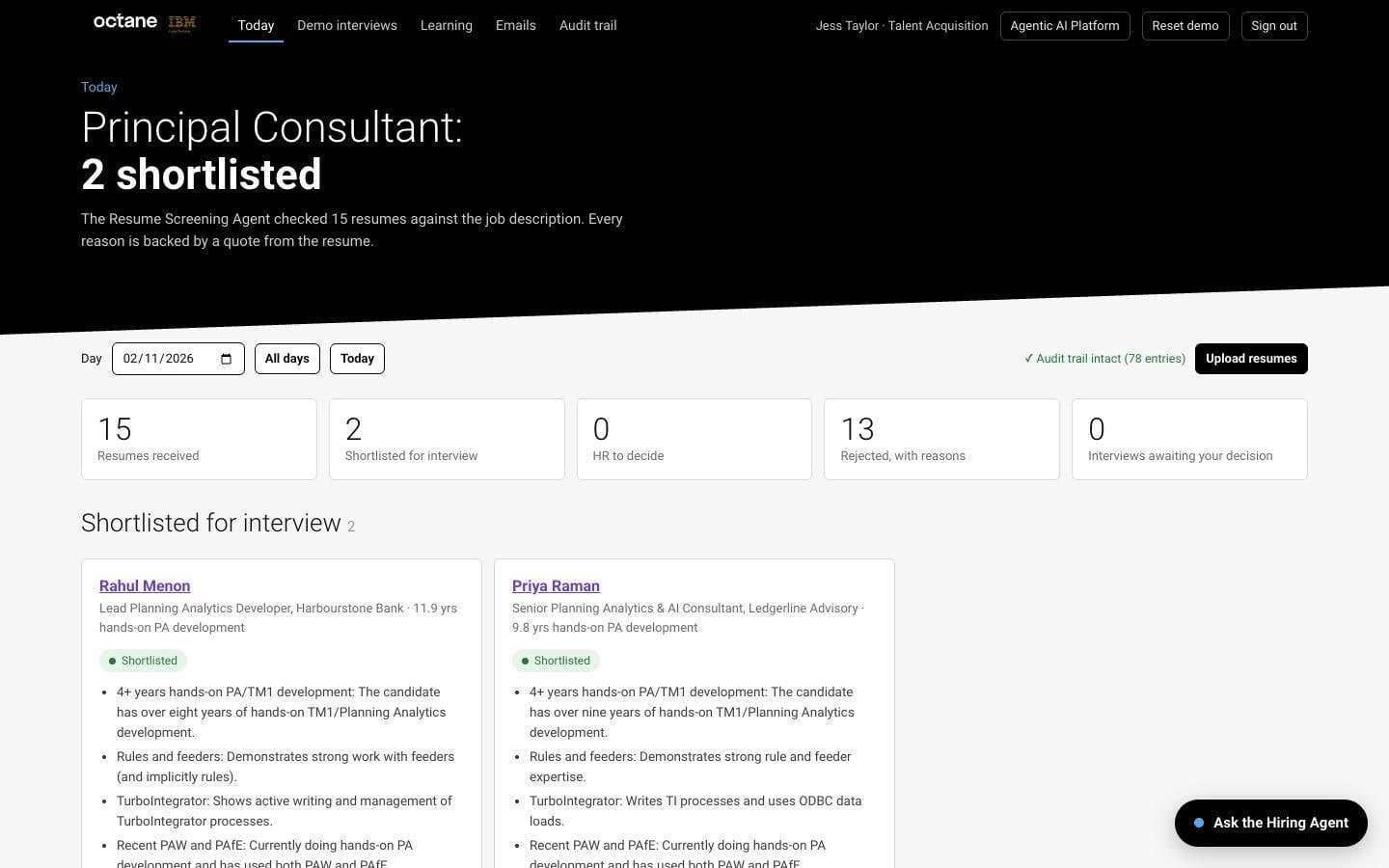
The daily view shows how many resumes were screened, who was shortlisted and why, with every reason quoted from the resume.
Scheduling and invitations. One click books the interview, creates a private link and sends a calendar invitation. The candidate is emailed the time, what to expect and their link.
The interview. An AI Interviewer holds a voice interview in the browser. It follows the interview guide and asks questions about the candidate’s own experience. It talks, listens, follows up and keeps to time.
Evaluation. The Interview Evaluation Agent scores each area from 1 to 4, using the candidate’s own words as evidence. Fixed rules apply the hiring bar.
The decision. A person advances or declines the candidate. Declined candidates receive their reasons only when HR chooses to send them.
Learning. A Learning Agent writes short lessons that improve the next screening and interview. HR can switch any lesson off.
A day with the hiring desk
An HR manager starts the day with three lists. They are shortlisted, needs a decision, and rejected. Fifteen resumes came in overnight. Two candidates are shortlisted, and each comes with reasons quoted from their resume. One click schedules an interview for each of them.
Later, the HR manager opens a candidate file. The resume sits beside the evidence for every requirement, so it’s easy to see why the candidate met the bar or fell short.
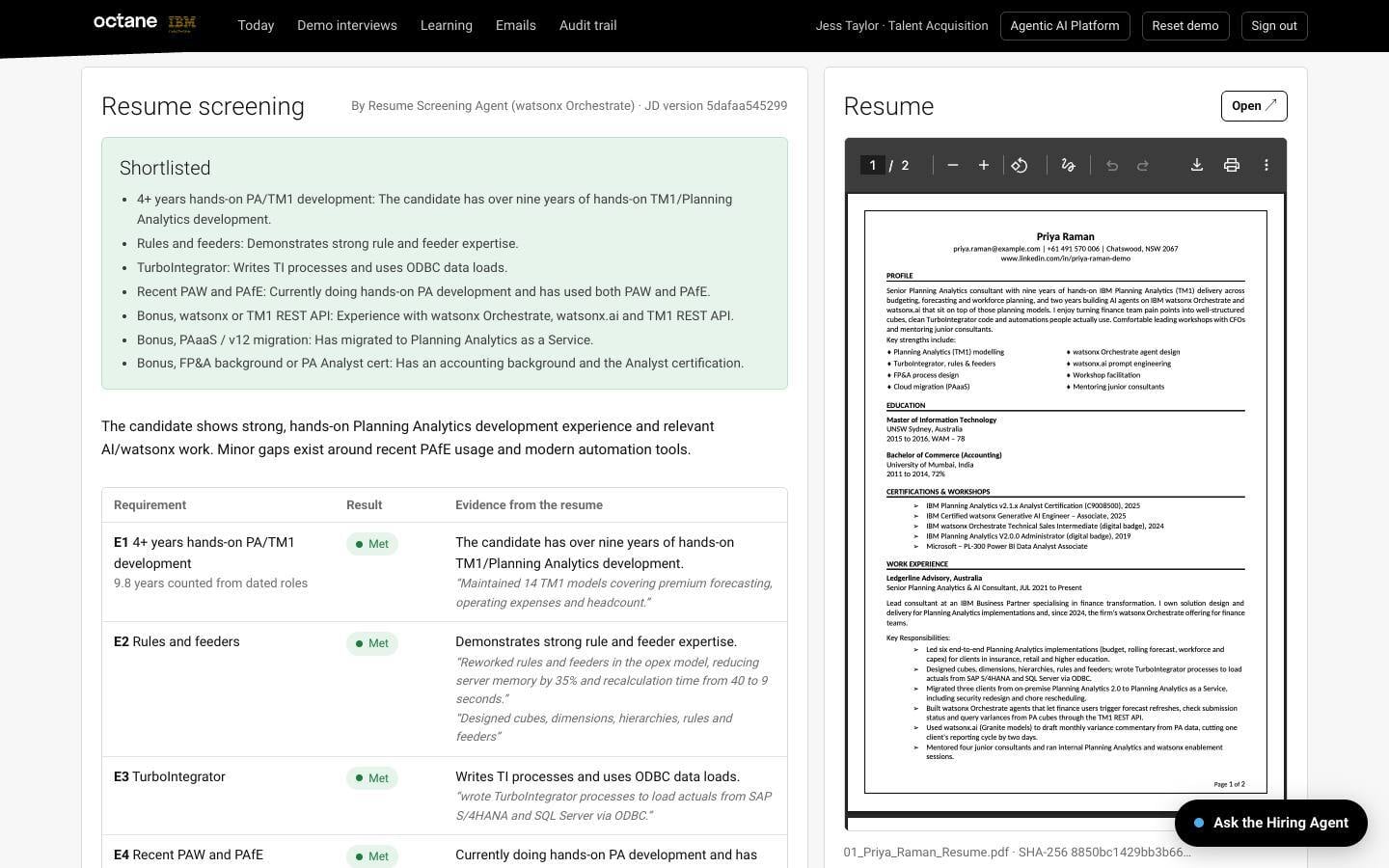
A candidate file. Each requirement is marked as met or not met, with the evidence quoted from the resume beside it.
That afternoon, a shortlisted candidate completes the voice interview from home. The AI Interviewer asks about real projects on their resume and follows up when an answer is thin. Within minutes the evaluation arrives. Each area is scored, and every score is backed by what the candidate actually said.
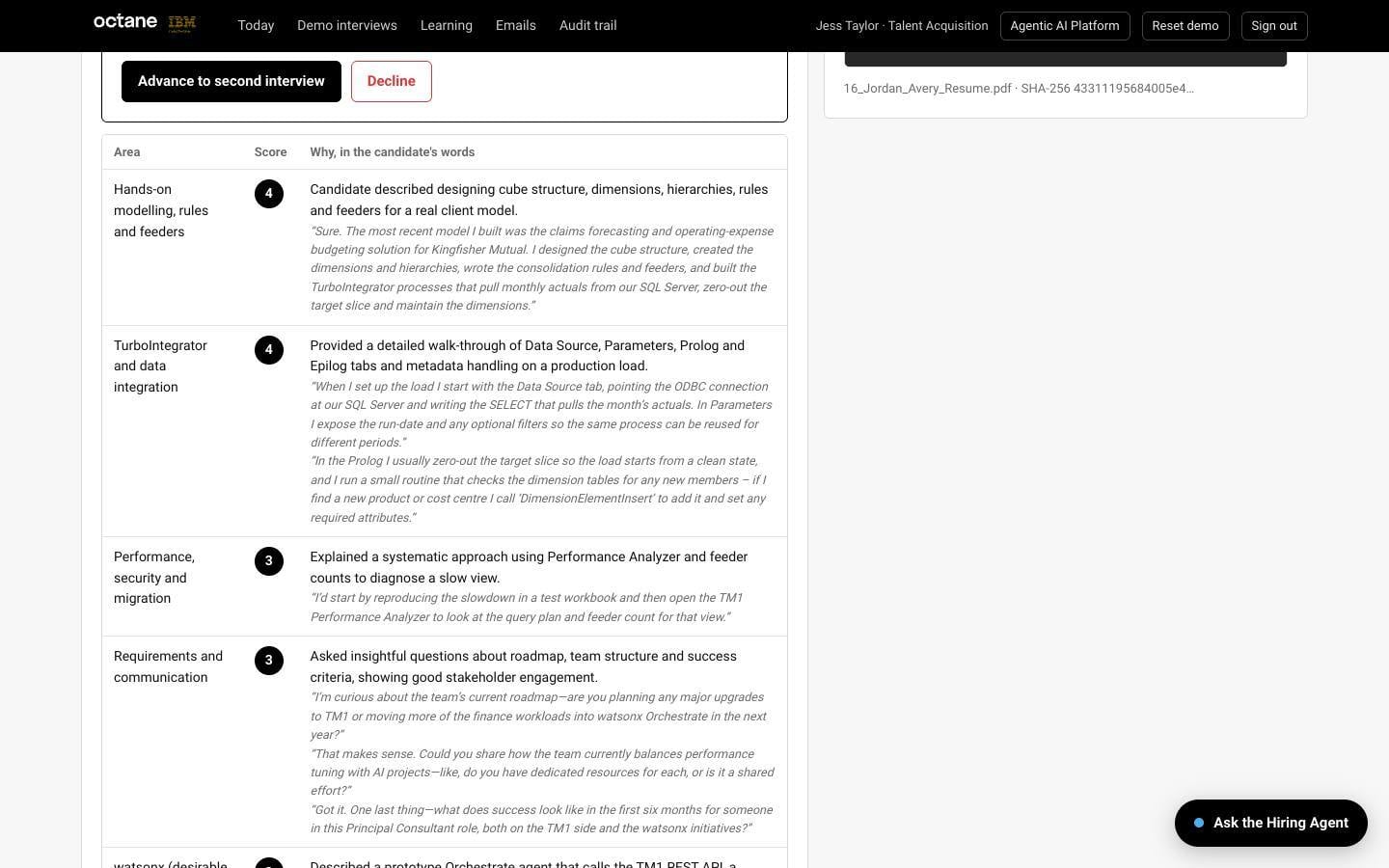
Interview scores. Every score from 1 to 4 is backed by a quote from the candidate’s own answers.
The HR manager reads the recommendation, listens to part of the recording and advances the candidate to a second interview. A built-in Hiring Agent answers plain-English questions, such as why a particular candidate was rejected. It advises, but it never shortlists, schedules or hires.
Fair by design
Fairness isn’t left to chance. The agents never see a candidate’s name, age, nationality or gender, and the interviewer never asks about them. Every reason has evidence, and quotes are checked against the resume and transcript. A claim with no real evidence is dropped.
Fixed rules decide who is shortlisted, who is rejected and what the interview recommends. The rules come straight from the job description and the interview guide, and no agent can talk its way around them. Human in the loop is built in, and only HR can advance or decline a candidate. Every step is written to a tamper-evident audit trail, so any hiring decision can be traced and explained.
What changes for your team
Before, recruiters read every resume in full and wrote their own notes. With the agents, they start each day with a shortlist and the reasons behind it.
Before, scheduling meant days of emails. With the agents, it takes one click.
Before, interview notes varied by interviewer. With the agents, every candidate is asked about their own experience, scored on the same scale and judged against the same bar.
The result is more time for the human parts of hiring, such as talking to candidates, selling the role and making the final call.
What the industry is seeing
IBM’s own HR function shows what agentic AI can do across HR. At IBM, 94% of common HR questions are resolved by AI, with 75% fewer HR support tickets and 40% lower HR operating costs over four years (IBM case study). These figures are for HR questions, not hiring. But they show how much can change when agents take on the routine work.
How this differs from a chatbot or automation
A general AI assistant can help a recruiter write a job advert or summarise a resume. But it doesn’t run the hiring process, doesn’t apply your hiring bar consistently and can’t show the evidence behind a decision. Traditional automation can send emails and book calendars, but it can’t read a resume or hold an interview.
Octane’s agents do the reading, interviewing and scoring inside a process with fixed rules and a full record. HR makes every decision.
Questions HR leaders ask
Will candidates accept an AI interview? The interview is short, focused on their own experience and available at a time that suits them. Every candidate gets the same fair questions.
Can we explain a rejection? Yes. Every reason is quoted from the resume or the interview, and HR decides whether and when to send it.
Is candidate data safe? Our demonstration uses synthetic candidates. For a real project, how your data is handled is agreed with your team at the start.
Do we have to replace our HR systems? No. In a real project, the agents connect to the systems you already use.
Getting started
The first step is a live demonstration, where you can watch a candidate go from resume to recommendation, including a voice interview. For organisations ready to go further, our Early Access Pilot proves the value on your own hiring in six to eight weeks. We agree the success criteria with your leaders, configure the agents for your roles, measure the results against today’s baseline and finish with an executive readout and a fixed-cost plan for production.
The bottom line
Faster hiring means fewer lost candidates. Screening and scoring every candidate the same way means fairer outcomes and better hires. Clear evidence means every decision can be explained, to the candidate, the hiring manager or an auditor. And your HR team spends its time talking to people, not managing paperwork.
Explore the HR agents at agents.octanesolutions.com.au, or book a demo with our team.
We go the extra mile so you can go the distance.
Screenshots are from Octane’s demonstration environment. The companies, people and data shown are fictional.
Hiring the right person is one of the most important things a business does. It’s also one of the slowest. A single role can attract hundreds of applications. Recruiters spend days screening resumes, chasing calendars and writing up interview notes. Good candidates accept other offers while they wait. Octane has built an AI hiring solution on IBM watsonx Orchestrate that takes a role from resume to recommendation, with a person making every hiring decision. This article explains how it works, how it keeps hiring fair, and what changes for an HR team that uses it. The business challenge The ...
.webp)


.jpeg?width=441&height=335&name=WhatsApp%20Image%202026-10-15%20at%2010.37.03%20AM%20(1).jpeg)
.png)
.png)

.jpg?width=334&height=341&name=dynamic%20parameters%201%20(1).jpg)