 0
0
 18 March 2026, 9:29:59 am AEDT
 10 min

 0
18 March 2026, 9:29:59 am AEDT
10 min
0
18 March 2026, 9:29:59 am AEDT
10 min

Why most TM1 environments underperform — and the four-step blueprint to fix it.
Why most TM1 environments underperform — and the four-step blueprint to fix it.

When a finance team tells me their TM1 environment "doesn't work", I've learned to listen carefully — because the platform is rarely the real issue.
What they actually mean is one of four things: Excel is creeping back in. Enhancements are taking months instead of days. The system goes down at the worst possible moment — mid-budget cycle or during month-end close. Or, most dangerously, the entire environment is held together by one or two people, and a single resignation away from a crisis.
The root cause of all four problems is the same: the operating model is reactive, knowledge is trapped, and improvements never get prioritised. In short, TM1 is not the problem. Support is.
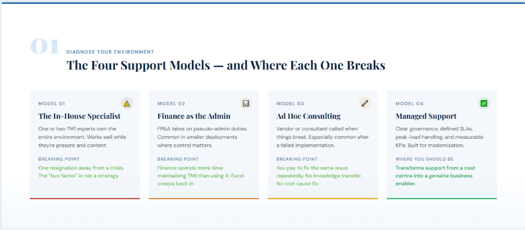
Most organisations fall into one of four support models. The first step to improving your environment is recognising which one you are.
You have one or two TM1 experts who own the environment. It works well when things are stable, and they're content. The breaking point arrives when they leave, or when the backlog grows faster than one person can manage. This is what the IT industry calls the "bus factor", what happens when the key person gets hit by a bus? It is not a strategy.
Finance has taken on the pseudo-admin role either because it was cheaper, more convenient, or gave them greater control. This works reasonably well in small deployments. It breaks when FP&A spends more time maintaining TM1 than using it for insights. The tool that was supposed to free finance ends up creating a new administrative burden, and Excel creeps quietly back in.
You call a vendor or consultant when things break. This is common — especially after a difficult implementation. The problem is structural: you pay to fix the same issues repeatedly, there is no knowledge transfer, no improvement, and you are essentially funding someone else's consulting pipeline by never resolving the root cause.
A model built for modernisation: clear governance, defined SLAs, mixed-maturity handling, peak-load capability, and measurable KPIs. This is the model that transforms support from a cost centre into a genuine business enabler.
Not the brochure version. The operational reality.
Modern support is built around five pillars:
Coverage and Response. Defined SLA targets — not best effort. You know what Priority 1 means, when the clock starts, and what happens next. Communication is transparent.
Single Intake Funnel. No artificial split between support, development, and training. If it helps the business, it goes into one queue. No out-of-scope conversations.
Prevention Over Firefighting. The goal isn't faster ticket closure — it's eliminating the ticket in the first place. Every resolved issue is reviewed: Is this recurring? If so, it goes into a problem backlog and gets a permanent fix.
Reporting and Accountability. Monthly KPI reports, backlog trends, and SLA compliance data. You can see what's happening and hold your support partner accountable.
A Live Road Map. Structured improvement with capacity built into every engagement. Not a list of hopes an actual plan with milestones.
The key mindset shift: modern support is not about faster ticket closure. It is about predictable cost, reduced risk, and continuous improvement — a model that prevents recurring pain rather than profits from it.
This is where most support models genuinely fail. In a reactive model, organisations pay to fix the same problem every month. In a prevention-led model, you invest once in understanding the root cause — and then it's gone.
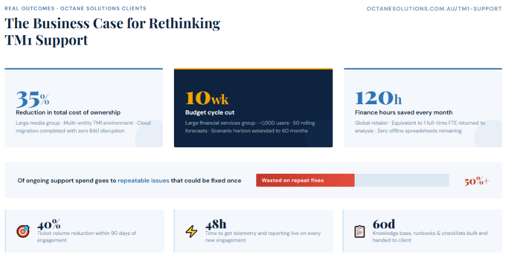
Based on our experience across client sites, more than 50% of ongoing support spend is going into repeatable issues that could be fixed once and automated. Think about that: half your support budget is fixing things that shouldn't be happening.
Effective prevention involves three things:
Recurring ticket elimination: Identify the patterns and close them permanently.
Proactive health checks: Log hygiene, performance baselines, and chore execution validation — run fortnightly or monthly before problems surface, not after.
Automation of manual issues: Every repeatable manual task is flagged for automation. As the environment stabilises, ticket volumes drop, and human intervention decreases.
The following outcomes come from actual client engagements — three different environments, three different sizes and industries, but strikingly consistent results.
A complex multi-entity TM1 environment with a heavy reporting load, mid-way through a cloud migration. By moving from a reactive break-fix model to a governed, predictable support structure with defined SLAs, this client eliminated their top five recurring issues within 90 days, reduced ticket volume by 40%, and completed their cloud migration with zero disruption to BAU operations including through a live budget cycle.
The lesson: The 35% cost saving is the headline. The mechanism predictable cost, removal of key-person risk, and proactive maintenance are what actually drove it.
Close to a thousand users, 50 rolling forecasts, and heavy allocation and scenario modelling workloads. The budget cycle was cut by ten weeks. Scenario modelling extended to a 60-month horizon. Finance shifted from process-heavy administration to genuine analysis.
The lesson: None of this came from a new module or feature. It came from platform stability. When the system isn't crashing, when changes don't take weeks, the team can actually start using it. That is what stable support contributes to planning transformation.
A finance team managing reporting across 15 to 20 offline spreadsheets. Reports that previously took weeks now take five minutes. 120 hours saved per month — roughly equivalent to one full-time finance analyst returned to the business for actual analysis. And zero offline spreadsheets remaining.
The lesson: For the CFO, eliminating spreadsheets was the most significant outcome not the time saving. Every uncontrolled spreadsheet is a version-control risk and an audit exposure. Stable TM1 support is not just an efficiency gain; it's a governance improvement.
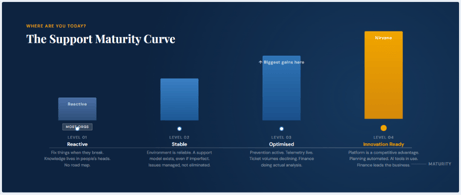
Most organisations, if honest, sit at Level 1 or Level 2. Here is the full picture:
Level 1 — Reactive: Fix things when they break. Knowledge lives in people's heads. No road map.
Level 2 — Stable: The environment is reliable. A support model exists, even if imperfect. Recurring issues are managed but not eliminated.
Level 3 — Optimised: Prevention is active. Telemetry is live. Ticket volumes are declining. Finance is spending more time on analysis than administration.
Level 4 — Innovation Ready: The platform is a genuine competitive advantage. Planning is automated. AI tools are actively in use. Finance is leading the organisation forward as a true business partner.
The opportunity is not moving from Level 1 to Level 4 overnight. It is taking the next step. Levels 2 to 3 are where organisations see the biggest returns.
Audit the environment. Fix the top five recurring issues. Stand up a single intake queue. Get telemetry and reporting live within 48 hours. Most organisations attempt to modernise before they have stabilised — that is backwards. Worse still, many implement another tool because the current one feels broken. Changing the tool will not solve a support model problem.
Telemetry is fully deployed. Minor requests are automated. SLA reporting live. The knowledge base is built out. Around this period, support ticket volumes will begin to decline noticeably.
If you are still on-premises, cloud migration should be a key consideration here (IBM Cloud or AWS, depending on your scale and environment). Legacy models decommissioned. Finance has shifted from process work to analysis. If you are on an older version, anything 10.2 or below, IBM ended support for those versions in April 2024. You are running unsupported software. This conversation is urgent.
Most organisations measure support costs as consultant invoices. The real cost is much broader:
Finance time wasted managing the tool instead of using it
Audit risk from uncontrolled spreadsheet use
Delayed forecasting and planning cycles
A platform too unstable to build upon
AI projects that cannot move forward because the data foundation is unreliable
That last point is increasingly critical. If your organisation has an AI strategy that involves TM1 data, and TM1 is crashing every month, you will have no confidence, nor will the AI team or the board in using those cubes as a foundation. Stable support is not the end goal. It is the prerequisite for everything else.
Ask yourself ten questions about your current support model:
During peak periods, is the system fast and reliable or slow and crashing?
How many recurring bugs or tickets do you handle every month?
What happens to unused support hours? Are they lost, or rolled forward?
Can your support model handle development work without a separate commercial fight?
How long does it take to deliver a critical finance report days, hours, or instantly?
Do you have performance monitoring on stats control cubes to spot regressions early?
Are your TM1 logs monitored so that accumulation doesn't silently pressure the server?
Who controls the ticket priority: finance, IT, or whoever shouts loudest?
Is there a knowledge base or runbook being actively maintained and shared?
Do you have an active road map aligned to IBM's support lifecycle?
Score one point for each yes. If your total is under seven, your support model is introducing meaningful risk into your finance function.
The good news: this is entirely fixable. The road map is clear, the outcomes are proven, and the first step is simply understanding where you are.
Contact the Octane Solutions team for a complimentary five-question health check assessment, or reach out to Amendra directly on LinkedIn. We work with organisations globally from Australia, New Zealand, and the Pacific through to India, the Middle East, and North America on a flexible, no lock-in basis.
Learn more and get started: www.octanesolutions.com.au/tm1-support

Amendra has a background in accounting and systems implementation. He has led teams and implemented BI tools like Canon, Vodafone and Macquarie. Amendra resigned from Macquarie after 8 years there in 2016 to start up Octane which is now a IBM Gold partner and provides consulting and deployment of IBM applications to clients globally.
 print
print


Leave a comment