Content_Cut_Icon Twitter_Brands_Icon

Modernise Your TM1. Without Breaking What Already Works

Mode_Comment_Icon_white0
Alarm_Icon_1_white13 min

Here’s a scenario I see playing out across organisations right now. Finance teams have invested significantly in TM1 — IBM Planning Analytics — but somewhere along the way, the platform stopped feeling like a competitive advantage and started feeling like a liability. Excel is creeping back in. Enhancements are taking months. The system goes down at the worst possible moment. And in many cases, ...

down-arrow-blue
Book_Open_Solid_Icon

Here’s a scenario I see playing out across organisations right now. Finance teams have invested significantly in TM1 — IBM Planning Analytics — but somewhere along the way, the platform stopped feeling like a competitive advantage and started feeling like a liability.

Excel is creeping back in. Enhancements are taking months. The system goes down at the worst possible moment. And in many cases, the entire environment is held together by one or two people who are a single resignation away from becoming a crisis.


I’ve spent the last twenty years working with TM1 environments across every size and industry, and this pattern is remarkably consistent. The tool is rarely the problem. The way organisations run and support the tool — that’s where things break down.

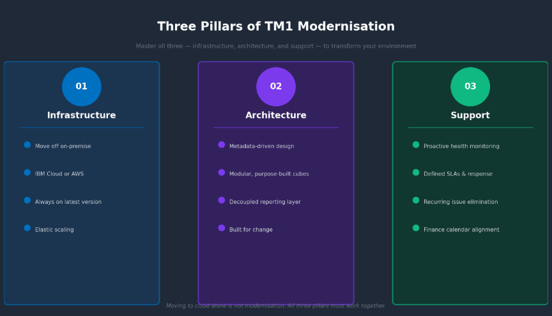
In our recent webinar, I walked through the three pillars that we believe will modernise any TM1 environment — without starting over, without a costly eighteen-month project, and without breaking the things that already work.

Pillar 1: Infrastructure — Are You Running on the Right Foundation?

The first thing we audit with any new client is their infrastructure. And almost without exception, on-premise sites are running on versions that are three to five years out of date. That’s not a criticism — it’s the reality of how upgrade cycles work when there are competing priorities and limited IT resources.

The consequences are real: technical debt, security exposure, and a platform that’s increasingly hard to build upon. IBM ended support for versions 10.2 and below in April 2024. If you’re still on one of those versions, this conversation is urgent.

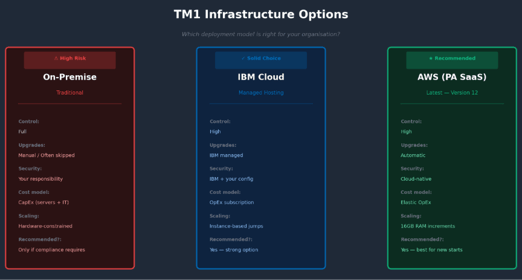
Today, there are three infrastructure options:

  • On-Premise: Full control, but the patching, security, and upgrades become your responsibility. In our experience, we have yet to encounter a single on-premise site running the latest version. Not one.

  • IBM Managed Hosting (IBM Cloud): IBM runs the platform for you. Upgrades are managed. The infrastructure burden shifts away from your team. This is a strong option if you want to focus budget on functionality rather than keeping the lights on.

  • AWS (PA on SaaS): The newest option, and in our view, the most compelling for organisations starting fresh or migrating today. Version 12, fully cloud-native, elastic RAM scaling in 16GB increments, and the lowest infrastructure overhead we’ve seen. Available in Australia and multiple other markets.

The economics matter here. On-premise can appear cheaper until you account for the IT time, upgrade projects, and security management it demands. Cloud pricing continues to decline. And migration itself is more straightforward than most teams expect — we have a dedicated team and a tested checklist that handles the move, including legacy Excel macros and TI processes that need extra care.

One important point: moving to the cloud is not modernisation on its own. If you move poor architecture onto better infrastructure, you still have poor architecture. Infrastructure is the foundation. Architecture is the next conversation.

Pillar 2: Architecture — Is Your Model Built to Last?

Legacy TM1 models accumulate debt in predictable ways. Different consultants come in over the years, each doing good work for the specific problem in front of them. But when you look at the model as a whole, the design may no longer reflect where the business is, or where it needs to go.

Some common symptoms we encounter:

  • Rules logic so layered over the years that no one can fully trace a number back to its source

  • Hard-coded dimension logic that makes even routine changes risky

  • Bloated, unused dimensions sitting in models and consuming memory

  • Critical processing knowledge living only in the head of one person

  • Metadata-driven design. Month rollovers, version changes, and business rule updates happen by changing a config cube — not by touching code.

  • Purpose-built, modular cubes. A separate staging layer, a core calculation layer, an input layer, and a reporting layer. It looks like over-engineering until you need to scale or change something.

  • Decoupled reporting. Reports connect to the relevant cubes and update automatically. Changes to the underlying model don’t cascade into manual reporting fixes.

  • Designed for change. The model is built for what the business will need, not just what was required at the time of build.

Modern TM1 architecture is built around a few core principles:

In some cases, we encounter, the accumulated technical debt is significant enough that a full rebuild is actually cheaper and faster than attempting to refactor what exists. We’ve seen organisations consider switching platforms entirely — not because TM1 couldn’t do what they needed, but because internal friction around a legacy model made change impossible. That’s a solvable problem, and it starts with an honest architecture assessment.

Pillar 3: Support — Moving from Reactive to Managed

This is the pillar that makes the most immediate difference, and the one most organisations have never properly addressed.

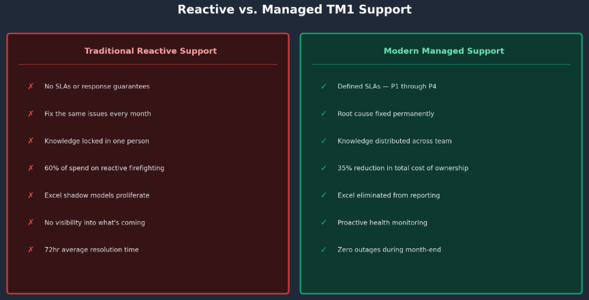
Traditional TM1 support looks like this: something breaks, someone raises a ticket, a consultant is engaged, investigation starts from scratch. The same issues recur every month. Knowledge lives in one person’s head. There are no SLAs, no health checks, no road map.

The data on this is stark. Around 60% of TM1 support spend goes into reactive work — fixing things that have already broken. Studies consistently show it costs three to five times more to fix production issues than to prevent them. And approximately 40% of finance teams report that Excel shadow models are running alongside TM1, filling the gaps where the platform is too slow or too broken to serve the business.


Modern managed support changes this. The key features:

  • Proactive health monitoring: Continuous environment monitoring rather than waiting for users to report problems

  • Finance calendar alignment: Support resources and capacity planned around budget cycles and month-end close, not allocated reactively

  • Defined SLAs: Users know what Priority 1 means, when the clock starts, and what happens next

  • Recurring issue elimination: Every resolved ticket is reviewed. Is this pattern recurring? If so, it goes into the backlog for a permanent fix

  • Knowledge transfer: No single-point-of-failure dependency. Multiple team members hold model knowledge, documented in a living knowledge base

The outcome, based on our work with clients across this model: a reduction of approximately 35% in total cost of ownership within the first several months and through optimised licensing, reduced reactive spend, and the compounding benefit of preventing issues rather than repeatedly fixing them.
The Practical Road Map: What to Expect and When

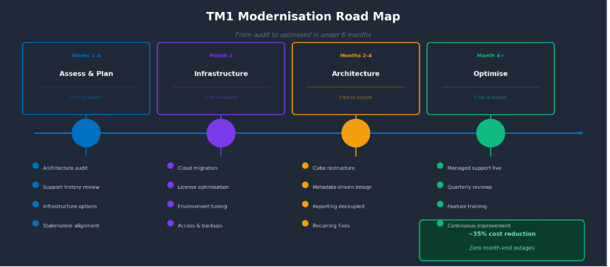
Modernisation does not need to be an eighteen-month programme. Here is what a practical timeline looks like:

Weeks 1–4: Assess and Plan

Audit the current architecture. Review support history — specifically, what tickets have recurred in the last six months and why. Assess infrastructure options and costs, including licensing implications. Align IT, security, and finance stakeholders on the direction.

Months 2–4: Execute

If migrating to the cloud, schedule and complete the migration. Begin architecture improvements, prioritised by business impact. Onboard managed support. Early benefits typically become visible around month four.

Ongoing: Optimise

Quarterly architecture reviews. Continuous performance tuning. Regular training as new features are released (IBM ships updates roughly every six weeks on the cloud). The knowledge base and road map stay live. Once this rhythm is established, improvements compound.
What Organisations That Have Done This Are Seeing

These are outcomes from actual client engagements, not projections:

  • Faster budgeting and month-end cycles: When the platform is stable and changes can be made quickly, the cycle compresses

  • Significant reduction in data errors: Proper architecture catches exceptions before they reach users

  • Zero outages during month-end: This is a bold statement, but it’s what the data shows when the foundational work is done properly

  • Finance teams spending more time on analysis than administration: The tool starts doing what it was bought to do

There is also a forward-looking consideration. If your organisation has any kind of AI strategy that involves TM1 data — and most do, or will — the data foundation has to be reliable. A platform that crashes at month-end is not a foundation you can build AI capability on. Modernisation is not the end goal. It is the prerequisite for everything that comes next.

Ready to Modernise Your TM1 Environment?

Octane Solutions is an IBM Gold Partner with over 100 TM1 projects delivered and the #1 IBM Partner award in the APAC region. We work with organisations globally — across Australia, New Zealand, the Pacific, India, the Middle East, and North America — on a flexible, no lock-in basis.

Our support tiers (Octane Green, Blue, and Black) are transparently priced on our website. If you’re not sure where to start, a complimentary health check will give you a clear picture of where your environment sits and what to prioritise.

Visit us: https://www.octanesolutions.com.au/tm1-support

Or reach out to Amendra directly on LinkedIn to discuss your environment.

If you’re on version 10.2 or below, or still running on-premise without a plan to move — this conversation is worth having today.


Leave a comment

Line

TM1 is never the Problem. Support is.

Mode_Comment_Icon_black0
Alarm_Icon_110 min

Why most TM1 environments underperform — and the four-step blueprint to fix it. 

Support

When a finance team tells me their TM1 environment "doesn't work", I've learned to listen carefully — because the platform is rarely the real issue. 

What they actually mean is one of four things: Excel is creeping back in. Enhancements are taking months instead of days. The system goes down at the worst possible moment — mid-budget cycle or during month-end close. Or, most dangerously, the entire environment is held together by one or two people, and a single resignation away from a crisis. 

The root cause of all four problems is the same: the operating model is reactive, knowledge is trapped, and improvements never get prioritised. In short, TM1 is not the problem. Support is.

The Four Support Models and Where Each One Breaks

Most organisations fall into one of four support models. The first step to improving your environment is recognising which one you are.

Model 1: The In-House Specialist 

You have one or two TM1 experts who own the environment. It works well when things are stable, and they're content. The breaking point arrives when they leave, or when the backlog grows faster than one person can manage. This is what the IT industry calls the "bus factor", what happens when the key person gets hit by a bus? It is not a strategy.

Model 2: Finance as the Admin

Finance has taken on the pseudo-admin role either because it was cheaper, more convenient, or gave them greater control. This works reasonably well in small deployments. It breaks when FP&A spends more time maintaining TM1 than using it for insights. The tool that was supposed to free finance ends up creating a new administrative burden, and Excel creeps quietly back in. 

Model 3: Ad Hoc Consulting

You call a vendor or consultant when things break. This is common — especially after a difficult implementation. The problem is structural: you pay to fix the same issues repeatedly, there is no knowledge transfer, no improvement, and you are essentially funding someone else's consulting pipeline by never resolving the root cause.

Model 4: Hybrid or Managed Support (Where You Should Be Heading) 

A model built for modernisation: clear governance, defined SLAs, mixed-maturity handling, peak-load capability, and measurable KPIs. This is the model that transforms support from a cost centre into a genuine business enabler.


What Modern TM1 Support Actually Looks Like

Not the brochure version. The operational reality.

Modern support is built around five pillars:

  • Coverage and Response. Defined SLA targets — not best effort. You know what Priority 1 means, when the clock starts, and what happens next. Communication is transparent.

  • Single Intake Funnel. No artificial split between support, development, and training. If it helps the business, it goes into one queue. No out-of-scope conversations.

  • Prevention Over Firefighting. The goal isn't faster ticket closure — it's eliminating the ticket in the first place. Every resolved issue is reviewed: Is  this recurring? If so, it goes into a problem backlog and gets a permanent fix.

  • Reporting and Accountability. Monthly KPI reports, backlog trends, and SLA compliance data. You can see what's happening and hold your support partner accountable.

  • A Live Road Map. Structured improvement with capacity built into every engagement. Not a list of hopes an actual plan with milestones.

The key mindset shift: modern support is not about faster ticket closure. It is about predictable cost, reduced risk, and continuous improvement — a model that prevents recurring pain rather than profits from it.

The Prevention Imperative

This is where most support models genuinely fail. In a reactive model, organisations pay to fix the same problem every month. In a prevention-led model, you invest once in understanding the root cause — and then it's gone. 

Based on our experience across client sites, more than 50% of ongoing support spend is going into repeatable issues that could be fixed once and automated. Think about that: half your support budget is fixing things that shouldn't be happening. 

Effective prevention involves three things:

  • Recurring ticket elimination: Identify the patterns and close them permanently.

  • Proactive health checks: Log hygiene, performance baselines, and chore execution validation — run fortnightly or monthly before problems surface, not after.

  • Automation of manual issues: Every repeatable manual task is flagged for automation. As the environment stabilises, ticket volumes drop, and human intervention decreases. 

Three Real Clients. Three Consistent Outcomes

The following outcomes come from actual client engagements — three different environments, three different sizes and industries, but strikingly consistent results.

Case Study 1: Large Media Group 35% Cost Reduction

A complex multi-entity TM1 environment with a heavy reporting load, mid-way through a cloud migration. By moving from a reactive break-fix model to a governed, predictable support structure with defined SLAs, this client eliminated their top five recurring issues within 90 days, reduced ticket volume by 40%, and completed their cloud migration with zero disruption to BAU operations including through a live budget cycle. 

The lesson: The 35% cost saving is the headline. The mechanism predictable cost, removal of key-person risk, and proactive maintenance are what actually drove it.

Case Study 2: Large Financial Services Group: 10-Week Budget Cycle Reduction 

Close to a thousand users, 50 rolling forecasts, and heavy allocation and scenario modelling workloads. The budget cycle was cut by ten weeks. Scenario modelling extended to a 60-month horizon. Finance shifted from process-heavy administration to genuine analysis. 

The lesson: None of this came from a new module or feature. It came from platform stability. When the system isn't crashing, when changes don't take weeks, the team can actually start using it. That is what stable support contributes to planning transformation.

Case Study 3: Global Retailer Zero Spreadsheets, 120 Hours Saved Monthly

A finance team managing reporting across 15 to 20 offline spreadsheets. Reports that previously took weeks now take five minutes. 120 hours saved per month — roughly equivalent to one full-time finance analyst returned to the business for actual analysis. And zero offline spreadsheets remaining. 

The lesson: For the CFO, eliminating spreadsheets was the most significant outcome not the time saving. Every uncontrolled spreadsheet is a version-control risk and an audit exposure. Stable TM1 support is not just an efficiency gain; it's a governance improvement.

The Support Maturity Curve: Where Are You?


Most organisations, if honest, sit at Level 1 or Level 2. Here is the full picture:

  • Level 1 — Reactive: Fix things when they break. Knowledge lives in people's heads. No road map. 


  • Level 2 — Stable: The environment is reliable. A support model exists, even if imperfect. Recurring issues are managed but not eliminated. 


  • Level 3 — Optimised: Prevention is active. Telemetry is live. Ticket volumes are declining. Finance is spending more time on analysis than administration. 


  • Level 4 — Innovation Ready: The platform is a genuine competitive advantage. Planning is automated. AI tools are actively in use. Finance is leading the organisation forward as a true business partner. 

The opportunity is not moving from Level 1 to Level 4 overnight. It is taking the next step. Levels 2 to 3 are where organisations see the biggest returns. 

The 6–12 Month Road Map

Months 1–3: Stabilise

Audit the environment. Fix the top five recurring issues. Stand up a single intake queue. Get telemetry and reporting live within 48 hours. Most organisations attempt to modernise before they have stabilised — that is backwards. Worse still, many implement another tool because the current one feels broken. Changing the tool will not solve a support model problem. 

Months 4–6: Optimise

Telemetry is fully deployed. Minor requests are automated. SLA reporting live. The knowledge base is built out. Around this period, support ticket volumes will begin to decline noticeably.

Months 7–12: Modernise

If you are still on-premises, cloud migration should be a key consideration here (IBM Cloud or AWS, depending on your scale and environment). Legacy models decommissioned. Finance has shifted from process work to analysis. If you are on an older version, anything 10.2 or below, IBM ended support for those versions in April 2024. You are running unsupported software. This conversation is urgent.

The True Cost of Poor Support


Most organisations measure support costs as consultant invoices. The real cost is much broader: 

  • Finance time wasted managing the tool instead of using it

  • Audit risk from uncontrolled spreadsheet use

  • Delayed forecasting and planning cycles

  • A platform too unstable to build upon

  • AI projects that cannot move forward because the data foundation is unreliable

That last point is increasingly critical. If your organisation has an AI strategy that involves TM1 data, and TM1 is crashing every month, you will have no confidence, nor will the AI team or the board in using those cubes as a foundation. Stable support is not the end goal. It is the prerequisite for everything else. 

Where to Start 

Ask yourself ten questions about your current support model:

  • During peak periods, is the system fast and reliable or slow and crashing?

  • How many recurring bugs or tickets do you handle every month?

  • What happens to unused support hours? Are they lost, or rolled forward?

  • Can your support model handle development work without a separate commercial fight?

  • How long does it take to deliver a critical finance report days, hours, or instantly?

  • Do you have performance monitoring on stats control cubes to spot regressions early?

  • Are your TM1 logs monitored so that accumulation doesn't silently pressure the server?

  • Who controls the ticket priority: finance, IT, or whoever shouts loudest?

  • Is there a knowledge base or runbook being actively maintained and shared?

  • Do you have an active road map aligned to IBM's support lifecycle?

Score one point for each yes. If your total is under seven, your support model is introducing meaningful risk into your finance function. 

The good news: this is entirely fixable. The road map is clear, the outcomes are proven, and the first step is simply understanding where you are. 

Ready to assess your TM1 support model?

Contact the Octane Solutions team for a complimentary five-question health check assessment, or reach out to Amendra directly on LinkedIn. We work with organisations globally from Australia, New Zealand, and the Pacific through to India, the Middle East, and North America on a flexible, no lock-in basis.

Learn more and get started: www.octanesolutions.com.au/tm1-support

Line

Modernising TM1: Why Cloud Migration Alone Doesn’t Solve the Problem

Mode_Comment_Icon_black0
Alarm_Icon_17 min

IBM Planning Analytics (TM1) remains one of the most powerful planning and modelling engines used by Finance teams worldwide. Yet many organisations eventually experience frustration with their TM1 environments — slow performance, painful upgrades, rising support costs, and the quiet return of Excel.

Contrary to popular belief, these challenges are rarely caused by TM1 itself.

They are symptoms of a modernisation gap.

The Hidden Drift Problem in TM1 Environments

TM1 models often start clean, efficient, and purpose-built. Over time, however, incremental changes accumulate:

  • New dimensions added without structural discipline

  • Rules layered onto legacy logic

  • TI processes expanded beyond their original design

  • Reporting logic intertwined with source data

  • Upgrade cycles deferred

  • Risk and compliance requirements

  • Upgrade tolerance

  • Internal IT capabilities

  • Cost predictability objectives

  • Metadata-driven logic instead of hard-coded processes

  • Modular cube design separating input, calculation, and reporting

  • Decoupled reporting layers

  • Performance-first feeder strategies

  • Cloud-aware security models

  • Structured change management practices

  • Issues detected late

  • Knowledge concentrated with individuals

  • Upgrades treated as disruptive events

  • Costs becoming unpredictable

What emerges is not a broken system — but a fragile one.

Performance declines. Change cycles slow. Complexity rises.

The Common (But Incomplete) Response: “Move to Cloud”

When issues surface, organisations frequently default to infrastructure decisions:

Move from on-premise to cloud
Adopt SaaS
Change hosting providers

While these shifts reduce infrastructure management overhead, they do not automatically modernise the model.

A poorly structured TM1 architecture behaves the same way regardless of where it is hosted.

Better infrastructure cannot compensate for design inefficiencies.

True TM1 Modernisation Requires Three Pillars

Sustainable TM1 environments align three interdependent areas.

1. Infrastructure Modernisation

Infrastructure choices should reflect:

Cloud platforms reduce maintenance effort — but they are only the foundation.

2. Architecture Modernisation (The Critical Lever)

Architecture modernisation is where the largest gains are realised.

Modern TM1 models typically prioritise:

Without architectural evolution, cloud migration simply relocates existing constraints.

3. Support Model Modernisation

Traditional break-fix support models introduce systemic risk:

Modern support approaches focus on:

Proactive monitoring
SLA-driven response models
Continuous optimisation
Upgrade lifecycle management
Knowledge transfer

This operating philosophy underpins Octane Blue, our proactive TM1 managed services model.

Why This Matters for Finance Leaders

Modernised TM1 environments typically deliver:

Faster budgeting and forecasting cycles
Lower data errors
Safer upgrade paths
Reduced operational friction
More predictable support costs

Most importantly, Finance teams regain time, stability, and confidence.

Final Perspective

Cloud migration is valuable — but it is not modernisation by itself.

Real TM1 modernisation redesigns how the model scales, performs, and evolves with the business.

📘 Download the TM1 Modernisation Roadmap (PDF) 
📊 Request a Free Upgrade & Risk Estimate 


Line

Tips on how to manage your Planning Analytics (TM1) effectively

Mode_Comment_Icon_black0
Alarm_Icon_13 min

Effective management of Planning Analytics (TM1), particularly with tools like IBM’s TM1, can significantly enhance your organization’s financial planning and performance management. 

TM1 newsletter

Here are some essential tips to help you optimize your Planning Analytics (TM1) processes:

1. Understand Your Business Needs

Before diving into the technicalities, ensure you have a clear understanding of your business requirements. Identify key performance indicators (KPIs) and metrics that are critical to your organization. This understanding will guide the configuration and customization of your Planning Analytics model.

2. Leverage the Power of TM1 Cubes

TM1 cubes are powerful data structures that enable complex multi-dimensional analysis. Properly designing your cubes is crucial for efficient data retrieval and reporting. Ensure your cubes are optimized for performance by avoiding unnecessary dimensions and carefully planning your cube structure to support your analysis needs.

3. Automate Data Integration

Automating data integration processes can save time and reduce errors. Use ETL (Extract, Transform, Load) tools to automate the extraction of data from various sources, its transformation into the required format, and its loading into TM1. This ensures that your data is always up-to-date and accurate.

4. Implement Robust Security Measures

Data security is paramount, especially when dealing with financial and performance data. Implement robust security measures within your Planning Analytics environment. Use TM1’s security features to control access to data and ensure that only authorized users can view or modify sensitive information.

5. Regularly Review and Optimize Models

Regularly reviewing and optimizing your Planning Analytics models is essential to maintain performance and relevance. Analyze the performance of your TM1 models and identify any bottlenecks or inefficiencies. Periodically update your models to reflect changes in business processes and requirements.

6. Utilize Advanced Analytics and AI

Incorporate advanced analytics and AI capabilities to gain deeper insights from your data. Use predictive analytics to forecast future trends and identify potential risks and opportunities. TM1’s integration with other IBM tools, such as Watson, can enhance your analytics capabilities.

7. Provide Comprehensive Training

Ensure that your team is well-trained in using Planning Analytics and TM1. Comprehensive training will enable users to effectively navigate the system, create accurate reports, and perform sophisticated analyses. Consider regular training sessions to keep the team updated on new features and best practices.

8. Foster Collaboration

Encourage collaboration among different departments within your organization. Planning Analytics can serve as a central platform where various teams can share insights, discuss strategies, and make data-driven decisions. This collaborative approach can lead to more cohesive and effective planning.

9. Monitor and Maintain System Health

Regularly monitor the health of your Planning Analytics environment. Keep an eye on system performance, data accuracy, and user activity. Proactive maintenance can prevent issues before they escalate, ensuring a smooth and uninterrupted operation.

10. Seek Expert Support

Sometimes, managing Planning Analytics and TM1 can be complex and may require expert assistance. Engaging with specialized support services can provide you with the expertise needed to address specific challenges and optimize your system’s performance.

By following these tips, you can effectively manage your Planning Analytics environment and leverage the full potential of TM1 to drive better business outcomes. Remember, continuous improvement and adaptation are key to staying ahead in the ever-evolving landscape of financial planning and analytics.

For specialized TM1 support and expert guidance, consider consulting with professional service providers like Octane Software Solutions. Their expertise can help you navigate the complexities of Planning Analytics, ensuring your system is optimized for peak performance. Book me a meeting

Line

Exploring the Power of Automation with IBM Robotic Process Automation (RPA)

Mode_Comment_Icon_black0
Alarm_Icon_13 min

In an era defined by digital transformation and efficiency, businesses are increasingly turning to automation to streamline their operations. One such powerful tool in the realm of automation is IBM Robotic Process Automation (RPA). In this blog post, we'll delve into the world of IBM RPA, exploring its key features, benefits, and how it is shaping the future of business processes.

fiji blog (2)


Understanding IBM RPA:

Robotic Process Automation, or RPA, refers to the use of software robots or "bots" to automate repetitive, rule-based tasks within business processes. IBM RPA is a comprehensive solution designed to enhance operational efficiency by automating mundane and time-consuming tasks, freeing up human resources for more strategic and creative endeavors.

Key Features of IBM RPA:

  1. User-Friendly Design: IBM RPA comes with an intuitive and user-friendly design that enables users to create automation workflows with ease. Its drag-and-drop functionality allows even those without extensive programming knowledge to design and implement automation processes.

  2. Cognitive Capabilities: Leveraging advanced technologies like artificial intelligence (AI) and machine learning (ML), IBM RPA goes beyond basic rule-based automation. The solution can adapt to changing scenarios, learn from patterns, and make decisions based on real-time data.

  3. Integration with Existing Systems: IBM RPA is designed to seamlessly integrate with a variety of existing systems and applications. This ensures a smooth transition to automation without the need for a complete overhaul of existing infrastructure.

  4. Scalability: Whether you are a small business or a large enterprise, IBM RPA is scalable to meet your automation needs. It can grow with your organization, adapting to increasing workloads and expanding automation requirements.

Benefits of IBM RPA:

  1. Increased Efficiency: By automating repetitive tasks, IBM RPA allows organizations to complete processes faster and with fewer errors. This not only increases efficiency but also enhances the overall quality of work.

  2. Cost Savings: Automation reduces the need for manual intervention in routine tasks, leading to significant cost savings in terms of time and resources. IBM RPA allows organizations to allocate human resources to more value-added activities.

  3. Improved Accuracy: Bots deployed through IBM RPA are programmed to follow predefined rules with precision. This reduces the likelihood of errors that can result from manual data entry or repetitive tasks.

  4. Enhanced Compliance: In industries with strict regulatory requirements, IBM RPA ensures that processes are executed consistently and in compliance with regulations. This reduces the risk of human error and associated compliance issues.

  5. Quick ROI: Organizations adopting IBM RPA often experience a rapid return on investment (ROI) due to increased productivity and cost savings. The time saved by automating repetitive tasks allows teams to focus on strategic initiatives that drive business growth.

IBM Robotic Process Automation is a game-changer in the automation landscape, providing organizations with the tools they need to enhance efficiency, reduce costs, and stay competitive in an ever-evolving business environment. As businesses continue to embrace digital transformation, IBM RPA stands out as a powerful solution that empowers organizations to automate intelligently, driving innovation and growth.

Want to learn more about RPA? Book us!


Line

Holly, jolly, and hassle-free: Let us handle your TM1 Support during the festive season 🎉

Mode_Comment_Icon_black0
Alarm_Icon_15 min

With the holiday season just around the corner, the air is buzzing with excitement as individuals eagerly anticipate spending quality time with their loved ones. As companies prepare for the annual shutdown, employees are gearing up for some much-needed rest and relaxation. However, amidst the festivities, it's essential to ensure that business operations continue to run smoothly, especially for those facing month-end reporting obligations.

IBM (4)


Maintaining Business Continuity:

The holiday season is a time to unwind, reflect, and connect with family and friends. However, in finance, the show must go on. As your key personnel take time off the forecasting and reporting must continue. This is where you can lean on us to ensure that your models and users are supported throughout this period. There is always an errant data load or a report that does not work the way it is meant to. Our Octane Blue TM1 team are an expert consultant and would be able to track issues and fix them. And yes we are available 24/7.

Eliminate Key Person Risk

Key man risk is the phenomenon of placing knowledge, skills, and important relationships in the hands of one or a few staff members. If this key man is to leave the business, they take their knowledge with them, leaving the business open for risk. This is a position that even most key persons hate as it limits their ability to progress within the organisation or get a promotion. This key person also wants to take a longer break and holidays. When this key person decides to move on from the role there is a mad scramble to do knowledge transfer. We walk into this scenario all the time to pick up the pieces and take over support. And in all the cases the model documentation is non-existent. 

Scale Up or Scale down

Your TM1 requirements are not static - You have busy months, unplanned outages, and a business that keeps evolving requiring your tools to keep up to pace. However, most of our support models are stuck in the past in a static mode. You can scale up or down based on what activities are happening in your application. During peak periods your users would appreciate having someone that can fix any data load and reconciliation issues that could suck up valuable hours waiting around. A lot of our clients also like having active monitoring during peak periods. On the same token, you can always scale down your usage of Octane Blue when there are no active support requirements or enhancements pipeline. Being a Pay as you go support you only pay for what you use.

No Contracts

We have a 100% client retention rate. There is no need for us to bind you to a 12-month contract or any other mechanism to keep you as a client. We believe our service and expertise are enough. Therefore we have removed the need to sign a 12-month contract. You can use us as a once-off or ongoing. We will take the burden of ensuring you are happy with the service and keep using us. We also don't ask you to break up with your existing vendor. 

How does it work?

Octane Blue is a 40-hour unit of octane services. We do not differentiate between Support and development. You can buy however units you need per month. No need to stress if you don't end up using the hours as we will roll it over for another month. You can utilize these hours for any support tickets, enhancements, or mini-projects. For larger projects, we recommend Octane Projects as that gives you a higher level of governance. 

We also open up our training portal for your users so they get access to unlimited free TM1 training. As you and us both know a trained user means a reduced number of tickets. 

What do our clients say?

Large Australian Steel company

This client is the leading steel supplier and manufacturer for the building and construction industry in Australia. They have been using TM1 for over 10 years. They started using Octane Blue for their support and enhancements in one of their divisions. 12 months on Octane has transitioned into supporting all divisions. In their quarterly TM1 User Forum, the team reflected on the benefits Octane Blue has delivered for them:

  • Mitigate Key people Risks and get an external view of best practice processes
  • More frequent review of the Planning process and system health
  • Cost-effective way to scale up
  • Create Additional Capacity to allow the internal team to work on higher-value critical work

Australia's Largest Commodity Organisation

This organisation is a unique mix of agribusiness and processing operations across multiple countries. They are the largest grains and oilseeds storage, handling, and processing assets in eastern Australia. They offer a global end-to-end supply chain. They have been using TM1 across the organization for their financial reporting and Budgeting. Due to M&A activity, their in-house team was at capacity and they started using Octane Blue. Initially, it was for End User support but has morphed into Development, Enhancement, and support streams.

What they love is :

  • 24/7 Support available to their global business
  • Support and development are handled in a more professional manner
  • Allow their in-house resources to focus on high-value work
  • Reduced Cost of Ownership for TM1
  • They can scale up Octane Blue to do Projects when required

All our clients are happy to provide a reference so we can facilitate a call with them. 

How do you start?


We ensure that onboarding you as a client is a seamless and easy exercise. We have our onboarding checklist that the team will use to ensure we have the correct level of access and work with your IT teams to get this organised. Post that we will go through model understanding and set up ticketing systems. All our services are SLA based so you have full transparency on tasks and status. 

You can start assigning us support and/or enhancement tickets. We recommend you get us to do a Flight check with you so we can gather a full understanding of the model very quickly as well as identify bottlenecks and complications built into it over the years. 

See here for more details. Octane Blue


Line

How does Octane TM1 Support services work and why is it so popular?

Mode_Comment_Icon_black0
Alarm_Icon_13 min

One of the interesting things about Octane Red and Blue is that there is no onboarding you can start to ticket on the first day of your subscription. Over time, we are studying tickets that the user creates and anticipate that the user will have the same ticket for the next month so we will create it in advance so that users will no longer make one, that is what we call recurring tickets.

desola-lanre-ologun-IgUR1iX0mqM-unsplash (1)
 

 There is a lot of automation that we can introduce, and this will no longer require any human intervention needed during the process, and tasks that are ticketed will be automated.

Preventative maintenance is where we take a lot of responsibility in TM1 to make sure that it is running lean, running clean, and running smart. If you don’t have a ticketing system within their organization, don’t worry because we will introduce you to a ticketing engine instead of sending emails, we will set up a ticketing app and the users can use this. This will help us track the ticketing hours we have every month and track the number of tickets made every month and if the volume of tickets reduces over the months passed.

In one of our client’s scenarios when they started with us, they were able to have 200 tickets, and then over time, we were able to reduce the tickets by 20% every 3 months. They just started with 3 units of Octane Blue and by the time with 6 months of engagement with the clients, we were able to reduce it to 1 ½. One of our KPIs with this product is the number of tickets, we want the volume of tickets to drop every month.

This ticketing application we use will help us read that to see how well we are on track. Once, the ticketing app is set up we are going to give the finance officer a chance to become the ticketing board leader, with this he gets to decide the priority tickets. The users then begin the ticketing on the board and the finance officer will be the one to decide what ticket to prioritize.

The process that happens between the finance office and the users is important because this is where preventive maintenance takes place. This is where we will take responsibility for how well your TM1 is running.

Let’s say you have opted in for the 40 hours of Octane blue, and you are already at the end of the month and there are 10 hours left. An octane (that is one of us) will ticket to themselves – “Preventive maintenance”, which means that they discovered something in the system like a bug or an issue that if eradicated will give ROI to make running TM1 easier in the consecutive months.

A finance person will have an opportunity to do two things, it is to roll the remaining 10 hours forward for the next month or have the 10 hours remaining to do preventive maintenance. Either way, we will take the responsibility to drive down the tickets that have been generated from month to month.

The limitation

Before subscribing to Octane Red or Blue, you need these three factors ready;

  • Project management
  • Costing
  • Timeline

Without those 3, it will cost you more dollars and we don’t want that to happen. Spending 16 hours on development only is not recommended because you will need to add more hours to keep your TM1 running.


Line

Smarter way to manage your TM1 Support and Development

Mode_Comment_Icon_black0
Alarm_Icon_16 min

If you are a TM1 user then you would have surely come across times when you required assistance in support or Development (DevOps) for your implementation. Thousands of companies use TM1 globally for financial and business performance reporting, calculation and presentation of KPIs, allocation, and apportionment, and as a tool for data collection. While having all that factors, a company may also experience pain points like costly consultants for TM1 Development and the struggle to hire a TM1 developer. We have released Octane Blue and Red which allows you access to TM1 developer and support resources on demand. 


rear-view-programmer-working-all-night-long (2)
 

3 instances Octane Blue can help you with your TM1 support and development

  • Your resident TM1 developer is getting bogged down in BAU tasks and unable to focus on Projects. This is a very typical scenario for mid-size TM1 shops. Your prized TM1 developer who understands business is not being utilized for Projects. This person also is responsible for keeping the lights on in the TM1 Planning Analytics and doing tasks like investigating data load issues, mapping mismatch, adding users, and answering small queries. Is this the best use of their time? Does this create a risk of the developer moving to another company where he can better utilize his skills and feel more valued?  This is where Octane Blue would be ideal where all the support tasks can be ticketed to the Octane team. This creates capacity in your TM1 capability to allow your internal teams to focus on bigger ticket items. Octane Blue is a cost-effective and professional approach to supporting your team. Octane Blue would provide you with seasoned DevOps staff who would be able to take on support and enhancements. Find out more here  Octane Blue

  • With the current turbulence in the skilled market, we have seen many instances where companies have had their TM1 resource leave and there is great difficulty in hiring another resource. The cost of resources has gone up significantly which means the budget has to be increased or compromises have to be made on the skill level. There have been times when Finance staff have been pulled into TM1 admin roles and expected to manage development and support. This is usually not sustainable, and you end up eventually losing your finance staff!  Octane can step in into this situation and take over the TM1 Support and development while you source your TM1 resource. The beauty of the Octane Blue service is that there are lock-in contracts. Use it for as long (or short) as you need us. 

  • You don’t need a full-time TM1 resource. Many sites don’t require a full-time TM1 resource. You may only need a TM1 expert when there is an issue or when you need some enhancements or development. This makes Octane Blue ideal as you only call upon our team when you need us – and we only charge for hours you consume! We also have a lite version which is Octane Red. It's quite comforting to know that you have experts on hand  – it could be just using the service during peak periods around month end and budgeting period. All our services are backed with SLA and response times.  

What you will love about Octane red and blue

  • No separation between the developer and support team – you will no longer have separate and different prices for development and support and talk to different people. You will no longer care whether you have co-development support because all you wanted at the end of the day is to have your cube built and want your reporting ready and done. But, with Octane red and blue you will no longer experience this problem from month to month on your plans because the price will be constant over the period of those months.

  • Rolling forward of the unused hour – some months are not so busy and you don’t really wanna pay for the months that don’t have much work that happened. With Octane red and blue you can roll forward those hours that you have not used up to one month. If you have used more hours that month you simply start working fewer hours the next month achieving the same equilibrium in your pricing. 

  • You will have a dedicated account Manager who will be the escalation point and would also be managing your services and communication between you and our team.  

How to get started with us

We have removed any friction from engaging our services. It’s simple to engage and there is no lock-in contract so you can stop the services easily as well. We have an onboarding checklist and we go through the documentation to get us the right level of access. We have security protocols around data access and access review. We take the privacy of your data seriously.   

Our team is all IBM-certified TM1 developers. You can start ticketing issues and support tasks from Day 1. It may take us a bit longer in the early days to resolve some of the tickets but as we build our understanding of your environment these times will reduce. We hold monthly meetings with you to go through the tickets and any outstanding issues. We also take this opportunity to suggest changes that may help eliminate issues. 

There are no limits to what you can ticket – it can be a development task, support task, or monitoring task. However, we may steer you to use our Projects mechanism for larger projects to ensure an appropriate level of governance is applied. You can also get more details on Octane blue here TM1 Developers

Fill out the form below and I will send you an information pack. 


Got a question? Shoot!

Lorem ipsum dolor sit amet, consectetur adipiscing elit, sed do eiusmod tempor incididunt ut labore et dolore magna aliqua.

Get more articles like this delivered to your inbox