 0
 21 January 2026, 9:00:01 am AEDT
 8 min

 0
21 January 2026, 9:00:01 am AEDT
8 min

Introduction IBM Planning Analytics Workspace 3.1.3 has made a noticeable difference to how I work with cube views every day. Instead of dragging views around and hoping I do not overwrite something important, I now use the built-in view selector to switch between different ...
IBM Planning Analytics Workspace 3.1.3 has made a noticeable difference to how I work with cube views every day. Instead of dragging views around and hoping I do not overwrite something important, I now use the built-in view selector to switch between different saved views in seconds.
With Undo and Redo available directly in the cube view, it feels safe to try new layouts, pivots, and filters because I can always step back if the result is not what I expected. Together, these changes reduce friction in my analysis, keep my report layouts intact, and help me move much faster from “idea” to “answer".
Before 3.1.3
Analysts had to drag views from the left panel onto the grid, risking accidental overwrites and losing custom filters and formatting with each swap. Finding the right view in a cluttered list of auto-generated names wasted time. Or they can click on three dots and click on ‘Add View’
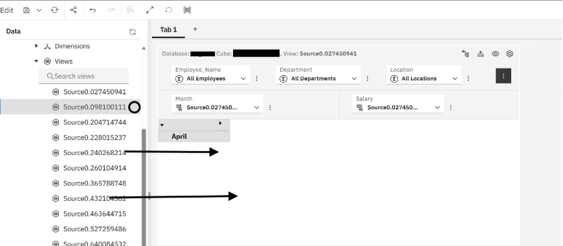
Now in 3.1.3
The new View selector dropdown lets you switch views instantly while preserving layout, filters, and formatting. Search by keyword to find relevant views fast.
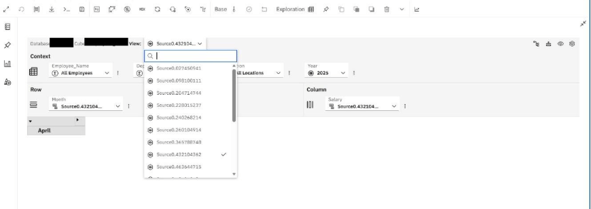
Key benefits:
Layout stays intact when switching views
Fast scenario comparisons (Actuals → Budget → Forecast)
Searchable view list for large libraries
Before 3.1.3
Changes to cube explorations were permanent. Pivoting dimensions, reordering members, or adjusting filters felt risky, so modelers hesitated to experiment and often retreated to Architect.
Now in 3.1.3
Native Undo/Redo buttons on the toolbar let you experiment safely. Move dimensions, adjust filters, and reorder members with confidence—revert instantly if needed.
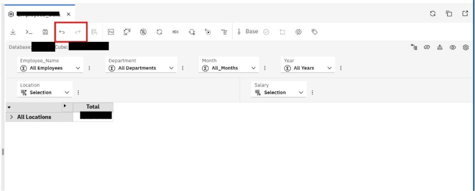
What you can undo/redo:
Move dimensions between context, rows, and columns
Expand/collapse hierarchies
Apply/remove filters
Reorder dimensions
Finance needs numbers right away, not after another walk to the breakroom. A few messy feeders or chunky dimensions usually drag everything down. Let us jump on a quick screen share, find the bottleneck, and get your speed back.
Speed up my cubesFor report builders: Use the view selector to build flexible reports; users switch views at runtime.
For modelers: Experiment freely with Undo/Redo; refine layouts through rapid iteration.
Planning Analytics Workspace 3.1.3 simplifies cube view workflows with a smart view selector and Undo/Redo. These features accelerate analysis, reduce friction, and help teams transition confidently from legacy tools to modern Workspace.
Enabling the cube viewer switcher needs to be done for each view separately, which is a drawback. It would be good to have a universal configuration for enabling it for all the views.
[1] IBM. What's new in modelling – 3.1.3. IBM Documentation, 2025. https://www.ibm.com/docs/en/planning-analytics/3.1.0?topic=2025-whats-new-in-modeling-313
[2] IBM. What's new in Planning Analytics Workspace 3.1.x? IBM Documentation, 2025. https://www.ibm.com/docs/en/planning-analytics/3.1.0?topic=workspace-whats-new-in-planning-analytics

Subject-matter specialist at Octane Solutions, helping Australian enterprise finance teams optimize planning, analytics, and automation.
 print


Leave a comment