.webp) 0
0
.webp) 24 July 2026, 9:45:00 am AEST
24 July 2026, 9:45:00 am AEST
.webp) 13 min
13 min
1. Introduction
Selector tiles in PAW help convert a normal cube view into a client-friendly dashboard control. Instead of asking users to open dimensions or manually change the cube context, they can simply click a tile such as Version, Year, Month, Entity, or Scenario and see the report change immediately.
This helps me change the dashboard view quickly while keeping the layout clean. The same selector can control a cube view, chart, or other synchronized object, so clients can move between summary and detailed views without changing the underlying cube structure. When used with hierarchies or virtual dimensions, selector tiles also make expand/collapse analysis easier and more guided.
2. What is a selector tile?
A selector tile is a visual selector connected to a dimension or hierarchy. It allows users to choose a member, set, or level and apply that selection to a synchronized cube view, chart, websheet, or other widget.
-
Example selectors: Actual/Budget, FY2026/FY2027, Month, Entity, Cost Center, Region, Customer, Product hierarchy.
-
Best use: compact filter bars on executive dashboards where users need quick selections.
-
Main value: one click can update several synchronized views and charts on the same page.
3. How selector tiles improve client dashboard views
-
Cleaner layout: selectors can sit in a top filter row, leaving more space for reports and charts.
-
Easy navigation: users can switch periods, scenarios, entities, and hierarchies without touching the cube structure.
-
Consistent reporting: the same selector can control multiple objects, so tables and charts stay aligned.
-
Reduced user error: clients interact with guided selectors instead of manually changing rows, columns, or context.
-
Reusable pattern: the same design works for finance, sales, operations, HR, supply chain, and management reporting dashboards.
4. Using virtual dimensions / hierarchies with selector tiles
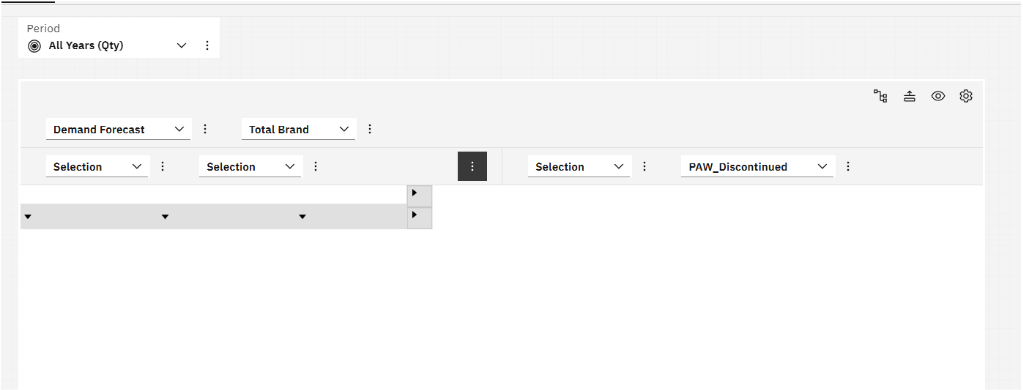
Planning Analytics hierarchies can behave like virtual dimensions. This helps when the same base data must be viewed through different business angles without creating many extra physical dimensions.
For example, a Product dimension can have hierarchies such as Product by Category, Product by Brand, Product by Region, and Product by Lifecycle. A selector can let the user choose the required hierarchy or members, while the cube view updates accordingly.
-
Use hierarchy selectors when clients need different rollups of the same data.
-
Use expand/collapse behavior when clients need to move from Total level to Category, Subcategory, or Product level.
-
Keep hierarchy names business-friendly so clients understand what they are selecting.
5. Synchronizing selector tiles with a cube view
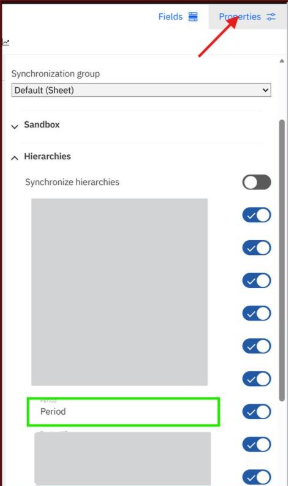
Synchronization connects the selector with the cube view. When the user changes the selector, the synchronized view or chart responds automatically.
-
Place the selector tile and cube view on the same PAW book or sheet.
-
Select the cube view and open Properties > Synchronize.
-
Enable synchronization for the required dimensions or hierarchies only.
-
Select the selector tile and keep it in the same synchronization scope or group as the cube view.
-
For pages with many objects, use a custom synchronization group so only the correct widgets move together.
-
Test single members, consolidated members, and expand/collapse behavior in consume/view mode.
6. How to add selector tiles in PAW
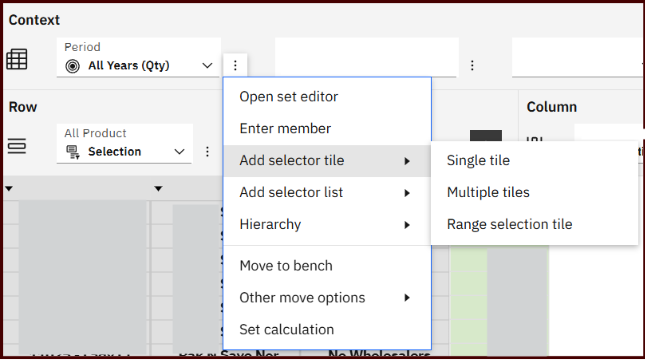
There are three common ways to add a selector-style control.
|
Method |
Steps |
|
From an existing exploration / cube view |
Open the book in Edit mode, open the cube view, use the dimension menu, choose Add selector tile, position it, format it, and synchronize it. |
|
From the Data tree |
Expand the database and cube, open the cube-specific Dimensions node, right-click the dimension/hierarchy/subset, choose Add selector tile or Add selector list. |
|
From Visualizations |
Open Visualizations, choose Selector, drag a dimension/hierarchy/set/level onto it, then format and synchronize it with the view. |
7. Selector tile vs selector list
Both controls help users select dimension or hierarchy members. The choice depends on space, number of members, and the type of user experience required.
|
Point |
Selector Tile |
Selector List |
|
Best for |
Compact dashboard filters |
Long member lists or browsing |
|
Look and feel |
Tile/card style, visually clean |
List/tree style, more detailed |
|
Space usage |
Small and dashboard-friendly |
Needs more vertical or side-panel space |
|
User action |
Quick single selection |
Search, scroll, expand/collapse, multi-selection when enabled |
|
Example |
Year, Month, Version, Scenario |
Account, Product, Cost Center, Customer |
|
Decision rule |
Use when options are few and simple |
Use when users must browse many members |
8. Recommended client dashboard pattern
-
Top header: dashboard title, refresh date, and key notes.
-
Selector row: Version, Year, Month, Entity, Scenario, and Currency selector tiles.
-
Main area: cube view and charts synchronized to the same selectors.
-
Side panel: selector list for large hierarchies such as Account, Product, Customer, or Cost Center.
-
Detail page: analyst view with more flexible selector lists and expand/collapse navigation.
9. Best practices and limitations
-
Create selectors from the cube context whenever possible so the selector matches the view being controlled.
-
Synchronize only the hierarchies that should respond; over-synchronization can confuse users.
-
Use tiles for simple executive filters and lists for large hierarchies.
-
Use custom synchronization groups when one page has multiple independent report areas.
-
Test with base members, consolidated members, and expand/collapse actions before sharing with clients.
-
Keep selector labels short and business-friendly, for example Scenario instead of technical dimension names.
10. Conclusion
Selector tiles make PAW dashboards easier to use, cleaner to present, and safer for clients. They allow users to change business views quickly while the developer keeps the cube view controlled and synchronized.
IBM documentation: Planning Analytics Workspace selector documentation
1. Introduction Selector tiles in PAW help convert a normal cube view into a client-friendly dashboard control. Instead of asking users to open dimensions or manually change the cube context, they can simply click a tile such as Version, Year, Month, Entity, or Scenario and see the report change immediately. This helps me change the dashboard view quickly while keeping the layout clean. The same selector can control a cube view, chart, or other synchronized object, so clients can move between summary and detailed views without changing the underlying cube structure. When used with hierarchies ...
.webp)
.png?width=604&height=340&name=roadmap%20(1).png)