Content_Cut_Icon Twitter_Brands_Icon

Cloud Migration – The God’s Algorithm

Mode_Comment_Icon_white0
Alarm_Icon_1_white4 min

For starters, God's algorithm is a notion originating in discussions of ways to solve the Rubik's Cube puzzle, but which can also be applied to other combinatorial puzzles and mathematical games. It refers to any algorithm which produces a solution having the fewest possible moves, the idea being that an omniscient being would know an optimal step from any given configuration (source wiki). With ...

down-arrow-blue
Book_Open_Solid_Icon

For starters, God's algorithm is a notion originating in discussions of ways to solve the Rubik's Cube puzzle, but which can also be applied to other combinatorial puzzles and mathematical games. It refers to any algorithm which produces a solution having the fewest possible moves, the idea being that an omniscient being would know an optimal step from any given configuration (source wiki).

With the constant barrage of messaging these days, almost pushing you over to adopt cloud, does the choice between “To Move” or “Not To” almost feel like cracking the “God’s Algorithm”? Well, hopefully by the time you are done reading this, you would have a fair bit of understanding around what it takes and what you should consider.

Okay, now that we have set the context, let’s try to understand why migration to cloud has become such an imperative.

There are primarily two major considerations; one being Cost and the other Business;

 When it comes to Cost, anything and everything related to Application, Server, Storage, Network, IT, Labor, and other overheads (like space, power, cooling) are your main considerations. Main drivers of such expenses would be around Hardware & Software maintenance, its administration and compulsory skill sets (read labor).

Business consideration however is more around the efficiencies that a cloud adoption would drive, freeing up precious time, labor, effort & funds which can then be re-directed towards building an Agile Enterprise, which, responds faster to market changes & demands, can scale up or down instantly (without bothering too much about sunk costs) and thrives on Thought leadership & Innovation

With all its advantages, it does however come neatly wrapped with “small prints”, which some organisations ignore to read and which is why they fail.

 Let’s look at some of these;

  • All clouds are not equal: Public, Private or Hybrid, each one of them have associated strengths and weaknesses. It’s key that the strengths resonate well with your need-gaps and critical that weaknesses do not impede your business plans in any way.
  • Keeping a scorecard: Its essential to evaluate all existing workloads with respect to their economic, security and risk profiles. This helps in deciding which one would go first or last or just stay.
  • Fine tuning: Once you are done deciding which workloads would make it to cloud, its necessary that you fine tune them for cloud utilisation. One size does “NOT” fit all.
  • Cloud "means" Outsourcing: This is what most organisations get wrong! While cloud does help you take your “hands-off”, doesn’t mean “eyes-off” too. Lacking in-house cloud management expertise can cost dearly and result in project failures.
  • Move beyond lift & shift: “Cloud isn’t helping us much, neither is it cost effective”, we get to hear this a lot. Using cloud should not only be about cheap storage and hardware but really about what more can you do with it. Don’t get it wrong, cloud’s term licensing tends to be always costlier in the short and medium term, however, when it comes to the Total Cost of Ownership vs Total Return on Investment, Cloud “always” wins hands down.

So, coming back to where we started, is a “God’s Algorithm” out there which would ensure migration to cloud fail proof? Well, while a lot of us are still searching, philosophies are gaining good shape… here’s is one of them with lots of fan following


Gods algorithm


The key is to break your strategy into bite-size pieces. A well-planned migration along with an airtight transition approach which has a razor-sharp focus on continuous improvement almost always ensures success. After all, you would know by the time you plan whether your application or workload is worthy of a cloud move.

 Hopefully this was some good food for your thought and optimistically has helped you make your decision between “To Move” or “Not To” a bit easier.


Who are we?

Octane Software Solutions Pty Ltd is an IBM Registered Business Partner specialising in Corporate Performance Management and Business Intelligence. We provide our clients advice on best practices and help scale up applications to optimise their return on investment. Our key services include IBM Planning Analytics (TM1) Consulting, Delivery, Support and Training.

 Octane has its head office in Sydney, Australia as well as offices in Canberra, Bangalore, Gurgaon, Mumbai, and Hyderabad.

Click here to find out more

Leave a comment

Line

Why Your Power BI Reports Drift From TM1 (And How to Eliminate Flat-File Drift Forever)

Mode_Comment_Icon_black0
Alarm_Icon_117 min

Quick Summary: When Power BI board decks disagree with IBM Planning Analytics (TM1), batch CSV exports and scheduled ETL jobs are almost always the cause. Here is how modern finance teams eliminate data drift, protect payroll security, and connect TM1 directly to Power BI using live REST queries.

Target Readership: CFOs, Heads of FP&A, TM1 Architects, and Power BI Leads.

Every finance team recognizes the Friday afternoon reconciliation panic.

The CFO prepares to present the monthly forecast to the board. They open the executive dashboard in Microsoft Power BI. At the same time, the financial planning manager reviews the live consolidation model in IBM Planning Analytics (TM1).

The EBITDA numbers do not match.

The variance is small, but the damage is immediate. Executive trust evaporates. The finance team stops analyzing operational performance and spends the next four hours chasing spreadsheets across network drives.

This discrepancy is not a user error. It is an architectural failure known as data drift. Here is why traditional TM1 reporting pipelines drift, the security risks hiding in your flat files, and how to connect Power BI directly to TM1 without staging tables.

DataFusion Integration Architecture: IBM TM1 In-Memory Engine to Power BI Reporting Layer

Figure 1: End-to-end integration architecture: IBM TM1 multidimensional in-memory cubes streaming directly to Microsoft Power BI via the DataFusion OData v4 REST connector.

Failure Mode: Batch CSV Export Loop 12-24H Stale Latency

1. In-Memory TM1 Cube: Analysts update dynamic forecast assumptions →
2. TurboIntegrator Export: Overnight batch script runs ASCIIOutput to dump unencrypted CSVs to network drive →
3. Scheduled Power BI Refresh: Gateway reloads stale file snapshots. Late-day adjustments are missed.

Business Risk: Executive board decks disagree with live models. Unencrypted payroll and departmental margins exposed on shared drives.
Recommended: DataFusion Automated REST Link Scheduled & On-Demand Sync

1. TM1 v12 Cube: Single authoritative financial model in memory with cell security preserved →
2. DataFusion REST Connector: Lightweight (< 100 MB) local Flask bridge querying TM1 via OData v4 REST API →
3. Power BI Dataset: Queries TM1 on demand or on schedule with zero intermediate CSV staging and zero external data storage.

Business Outcome: Zero flat-file drift. One-click instant refresh with record counts displayed. Unlimited users, data, and servers.

1. The Anatomy of Reporting Drift

To understand why numbers drift, look at the path data takes from your TM1 cube to your Power BI visuals. In most organizations, this path relies on a batch export loop:

  1. The Live Plan: Business units enter revenue assumptions and labor headcounts into Planning Analytics Workspace (PAW). TM1 recalculates consolidated numbers in memory in real time.
  2. The Scheduled Export: Overnight, a TurboIntegrator (TI) process runs ASCIIOutput scripts to dump multidimensional cube slices into flat CSV files.
  3. The Shared Network Folder: These CSV files land on a local server or network drive.
  4. The Gateway Refresh: The Power BI on-premises data gateway triggers a scheduled import refresh early in the morning.
  5. The Executive View: Executives review the dashboard at 2:00 PM.

What happens if an analyst posts a late adjustment in TM1 at 10:00 AM?

The adjustment sits in TM1. Power BI will not reflect that number until the next overnight batch run. For an entire business day, your reporting layer shows stale figures. When organizations try to fix this by scheduling more frequent export scripts, they run directly into server locking issues, memory spikes, and fragile file dependencies.

2. The Three Hidden Risks of Staged Reporting

Batch exports create problems far beyond stale dashboard views. They introduce operational vulnerabilities that affect audit compliance, server stability, and data security.

Risk 1: Unencrypted Data Exposure

When you export TM1 data to CSV files, you strip away TM1 security. Unencrypted flat files containing sensitive payroll, executive compensation, and departmental margins often sit on network shares. Anyone with directory access can read these files. Staged reporting creates an unnecessary compliance risk for internal audit teams.

Risk 2: Brittle TurboIntegrator Maintenance

TurboIntegrator export scripts require hardcoded dimensions and element names. When your business adds a new entity, updates a cost center, or restructures a chart of accounts, those static TI scripts fail. Analysts must stop their planning work to debug broken scripts and adjust column mappings. If you want to review model health, read our TM1 Feeder Diagnostic Playbook.

Risk 3: Double Cloud Storage and Licensing Costs

Many IT teams try to solve flat-file drift by pushing TM1 data into an intermediate SQL database or Snowflake warehouse. This creates double data storage costs. You pay to store the data in TM1, and you pay again to host relational staging tables. Worse, you lose dynamic TM1 calculation rules. Every time rules change, engineers must rebuild ETL transformation pipelines.

3. Four Ways to Connect TM1 to Power BI: An Architectural Comparison

Finance organizations generally choose between four integration methods. Here is how they compare in production:

Integration Method Latency Cell Security Setup Complexity Server Load Impact
TI Flat-File CSV Export 12 to 24 Hours Stripped (Unencrypted) High Script Maintenance Moderate Disk I/O
Intermediate SQL Warehouse 4 to 12 Hours Rebuilt Manually Very High (Custom ETL) High Staging Overhead
Native Microsoft OData Feed Real Time Inherited Moderate (Power Query) High (JSON Memory Out)
DataFusion TM1 Connector Scheduled & On-Demand Inherited Automatically Low-Code (< 100 MB .exe) Low (OData v4 REST API)

While TurboIntegrator flat-file exports remain common, they treat an in-memory calculation engine like a static file dump. Similarly, Microsoft Power BI standard OData feeds struggle to parse complex multi-dimensional JSON views, frequently running out of memory during peak month-end refreshes.

The modern alternative is automated REST integration. DataFusion connects Power BI directly to the TM1 calculation engine using optimized OData v4 REST calls. It queries only the requested cube intersections, inherits cell security, and requires zero external data staging.

4. TM1 v12 and the Natural Shift to Direct REST Integration

Honoring TM1's Heritage: The Evolution of Manny Perez's Functional Database

For over forty years, TM1 has stood apart because of the functional database architecture Manny Perez pioneered in 1983: in-memory multi-dimensional calculations that traditional relational databases could never match. As TM1 evolves into TM1 v12, that core calculation power remains at the heart of the platform. The main evolution is how data flows around it. In containerized cloud environments without mapped Windows drives or local server file systems, integration naturally moves from batch text exports to direct, native REST APIs (like OData v4).

As organizations plan their upgrade path to TM1 v12, moving away from scheduled flat-file handoffs becomes a welcome simplification.

As detailed in our breakdown of IBM Planning Analytics Engine 12 Architecture, TM1 v12 runs on containerized microservices. In this modern setup:

  • TurboIntegrator processes run within isolated containers rather than relying on on-premises Windows batch scripts.
  • Ephemeral container storage makes external text file transfers unnecessary.
  • Reports in Power BI connect directly to the in-memory calculation engine through secure, governed REST interfaces.

DataFusion operates natively on REST protocols. It is designed to work with both traditional TM1 installations (10.2.2+) and containerized TM1 v12 environments without requiring architectural re-engineering.

5. Under the Hood: How DataFusion Works

According to the official DataFusion Technical Spec Sheet, the connector is engineered as a zero-overhead bridge designed specifically for finance and BI teams:

1. Prepackaged Standalone Executable (< 100 MB)

DataFusion runs as a standalone Windows application with zero external runtime dependencies, registry modifications, or complex client installs. It runs an embedded local Flask bridge on port 5000 (localhost:5000) to establish the direct communications link.

2. Direct OData v4 REST Connectivity

The software connects directly to the IBM Cognos TM1 REST API (default ports 5495 / 5498 SSL) using standard OData Version 4. It works seamlessly across IBM Cognos TM1 10.2.2 and above, Planning Analytics Local, and TM1 v12.

3. Selective Dataset & Metadata Link Generation

Users authenticate with their standard TM1 credentials, select the specific cube, dimensions, and views required for reporting, and click Get Link. DataFusion generates an encrypted, reusable link code for that specific dataset.

4. Universal BI Compatibility (Power BI, Tableau, Qlik)

Paste the link directly into Microsoft Power BI Desktop or Service. Power BI stores the link in its dataset library—once linked, it never needs re-linking. DataFusion also natively supports Tableau and Qlik.

5. Scheduled & On-Demand Sync with Record-Count Verification

Reports refresh automatically on your defined Power BI schedule or on demand. When users click Refresh manually in Power BI, an instant pop-up displays the exact count of records extracted from TM1 for transparent reconciliation.

Because DataFusion simply picks up and passes data discretely from TM1 to Power BI, customer financial data is never stored externally. The licensing model is straightforward: a 60-day free trial, setup in under 1 hour with Octane, and an unlimited subscription covering unlimited users, unlimited data, unlimited links, and unlimited servers (dev, test, prod).

6. Executive Action Plan: Eliminating Data Drift

To establish a single source of truth across your finance organization, follow these four steps:

  1. Audit Your Current Reporting Latency: Identify every report used by executive leadership. Measure the time delay between user input in TM1 and visibility in Power BI. If the delay exceeds 15 minutes, your pipeline suffers from data drift.
  2. Remove Flat Files from Shared Drives: Scan local network shares for exported CSV and Excel dumps. Replace unencrypted file paths with direct REST connections to protect confidential financial data.
  3. Align with Modern Support Models: Ensure your TM1 support team actively monitors REST integration performance rather than just fixing broken batch scripts. Review our guide on How to Evaluate IBM Planning Analytics Support Models to balance support capacity.
  4. Test Direct Query in a Pilot View: Select one high-frequency financial report, such as weekly cash flow or daily revenue tracking. Connect that cube directly to Power BI using Datafusion. Compare the refresh speed and data accuracy against your legacy batch export.

Eliminate the Friday Panic

Executive reporting should inspire strategic confidence, not spark data reconciliation debates.

When you connect Microsoft Power BI directly to the IBM Planning Analytics engine, you preserve the calculation power of TM1 while delivering instant, trusted visuals to leadership.

Ready to Modernise Your TM1 to Power BI Reporting?

Explore how the Datafusion TM1 Connector helps your finance team report like pros with zero TM1 development.

Explore Datafusion TM1 Managed Support
Line

Beyond the Monolith: Why IBM Planning Analytics Engine 12 Changes Everything for TM1 Architects

Mode_Comment_Icon_black0
Alarm_Icon_122 min

Quick Summary: IBM Planning Analytics Engine 12 (TM1 12) is the cloud-native re-engineering of the classic in-memory TM1 database engine. It replaces the 30-year-old monolithic server process (tm1s.exe) with containerized microservices on Red Hat OpenShift, enabling automated zero-downtime snapshots, elastic compute scaling, and secure REST-driven integrations.

Target Readership: TM1 Architects, FP&A Systems Leaders, and Finance Transformation Directors.

For three decades, IBM Planning Analytics (TM1) has powered the world's most demanding financial consolidation and operational forecasting models. Its in-memory calculation speed allowed finance teams to model complex multi-dimensional scenarios in seconds.

However, running enterprise TM1 on a monolithic architecture came with well-known operational friction:

  • 45-minute server reboot cycles during model maintenance.
  • Memory fragmentation requiring scheduled weekend reboots.
  • Heavy reliance on fragile operating system batch scripts via ExecuteCommand.
  • Client-side dependency on legacy 32-bit Windows utilities like TM1 Architect and Perspectives.

With IBM Planning Analytics Engine 12 (TM1 v12), IBM has rebuilt the infrastructure surrounding the TM1 calculation engine. Here is what TM1 architects, finance systems leaders, and FP&A directors need to know about TM1 v12, what changes under the hood, and how to prepare your models for the modern cloud-native era.

A Note to the Community: Keeping TM1 as TM1

In recent community discussions on LinkedIn, veteran architects and IBM Champions rightfully reminded us of an enduring truth: TM1 is TM1—the functional database pioneered by Manny Perez in 1983. While IBM marketing has cycled through product names over the decades (Applix TM1, Cognos TM1, Planning Analytics Local, PA Engine, and Engine 12), the soul of the technology remains Manny’s functional in-memory multidimensional engine. In this guide, whether we refer to it as TM1 v12 or IBM’s official packaging of Planning Analytics Engine 12, our focus is honoring that engine while dissecting the modern containerized infrastructure built around it.

1. The End of the 30-Year Monolith

In traditional TM1 (version 11 and earlier), every component of a TM1 database instance lived inside a single monolithic operating system process (tm1s.exe). When users logged in, queried views, ran TurboIntegrator (TI) processes, or saved data, everything competed for the same thread pool and memory space.

If an unoptimized feeder caused an out-of-memory error (as explored in our TM1 Feeder Diagnostic Playbook), the entire server instance could crash for all active users.

Lengthy Server Restarts

Loading dozens of gigabytes of cube data and recalculating feeders from disk on startup meant that any configuration change required taking the model offline for 20 to 60 minutes.

Fragile Operating System Dependencies

Many legacy TI processes relied on ExecuteCommand to trigger local PowerShell or Windows batch scripts to move files, create directories, or send notification emails. These scripts broke whenever underlying OS permissions or file paths shifted.

The 2026 Support Cutoff

Standard support for Planning Analytics 2.0.9 ended on October 31, 2025, and extended support concludes on October 31, 2026. Organizations still running legacy versions must modernize their architecture to maintain security compliance. If your team is reviewing support options, see our guide on How to Evaluate IBM Planning Analytics Support Models.

2. Inside Engine 12: Cloud-Native Microservices Architecture

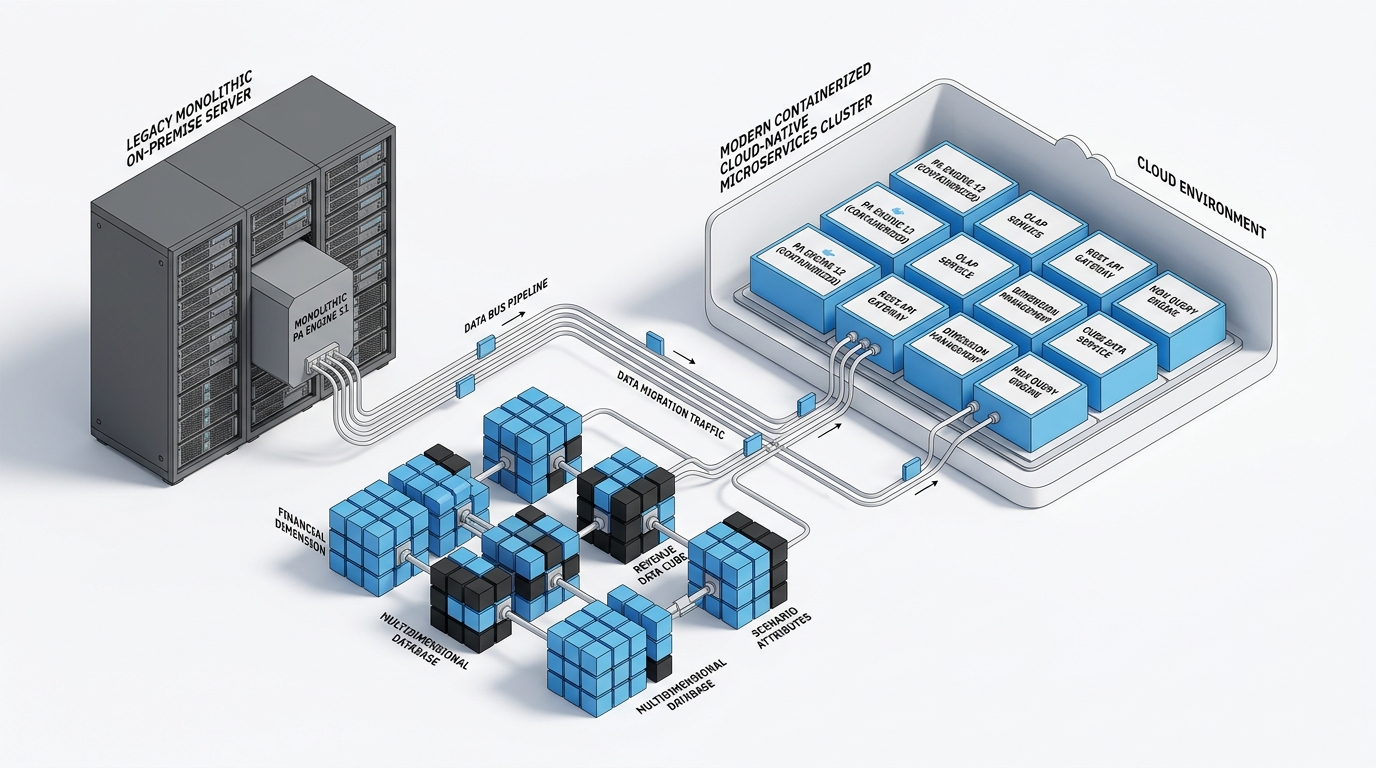
Engine 12 fundamentally decouples the TM1 environment. Rather than running a single monolithic server, Planning Analytics 3.1 runs on a containerized, cloud-native architecture built on Red Hat OpenShift.

Figure 1: IBM Planning Analytics Engine 12 Cloud-Native Architecture Breakdown
RED HAT OPENSHIFT CONTAINER PLATFORM (ENGINE 12 CLUSTER) 1. Stateless Gateways SSO & OAuth 2.0 Auth Identity Token Routing REST API Gateway TM1 OData REST Endpoints PAW Web Session Router Zero-Lock Client Balancer [Scales on Demand] 2. TM1 Calculation Engine In-Memory Cube Pods Multi-Threaded Aggregations Rule Calculation Engine Feeder Evaluation & Stash Multi-Replica HA Dynamic Active Read Replicas [Isolated Memory Space] 3. Cloud Persistence Continuous Snapshots Zero-Downtime Backups Managed S3 Storage Cloud Object Repository Auto-Directory Gen Native AsciiOutput Paths [Decoupled Storage]
Architecture Component Legend & Technical Role:
1. Stateless Gateways (Left Block): Handles user authentication, SSO SAML/OIDC tokens, and OData REST API routing. Because it is completely stateless, user logins never compete with cube calculation threads.
2. TM1 Calculation Engine (Center Block): The high-performance in-memory OLAP core. Cubes, rules, and feeders run in isolated calculation pods. Organizations can scale multiple active read replicas to serve peak budget cycles without duplicating physical hardware.
3. Cloud Persistence Layer (Right Block): Decoupled cloud object storage executing continuous background snapshots. Reboots take seconds instead of 45-minute cold loads because memory states are restored instantly.

The core calculation engine remains an ultra-fast in-memory OLAP database, but the infrastructure surrounding it has been completely modernized into discrete services:

  • High Availability and Multi-Replica Databases: Engine 12 treats databases as managed cloud services. You can deploy active replicas that scale compute resources dynamically based on peak forecasting demands without duplicating physical hardware.
  • Automated Directory Creation and File Handling: Functions like TextOutput and AsciiOutput now create target directory structures automatically on cloud object storage. Developers no longer need to write manual OS directory creation routines.
  • REST-Native Automation with ExecuteHTTPRequest: Direct operating system command execution (ExecuteCommand) is retired in Engine 12 for enterprise security. In its place, TI processes use ExecuteHTTPRequest to communicate with external APIs, Azure Logic Apps, Power Automate, or serverless microservices. This eliminates the custom glue code friction we analyzed in Why Enterprise AI Projects Stall on API Glue Code.

3. The Retirement of Legacy 32-Bit Tooling

Moving to Engine 12 marks the official end of legacy client applications that have supported TM1 developers for decades:

  • Retired Tools: TM1 Architect, TM1 Perspectives (Excel Add-in), Performance Modeler, and TM1 Applications Web.
  • Planning Analytics Workspace (PAW): The central web-based interface for all modeling, cube authoring, rule editing, process configuration, and dashboard design. To get the most from PAW modeling, see our deep-dives on Mastering MDX in Planning Analytics Workspace and Selector Tiles in PAW.
  • Planning Analytics for Microsoft Excel (PAfE): The high-performance, modern 64-bit Excel add-in utilizing REST API endpoints for dynamic exploration and reporting.
  • Enterprise BI Integration: For teams connecting live TM1 cubes directly to executive dashboards, solutions like Datafusion for Real-Time Power BI Integration provide direct, high-speed reporting pipelines without manual data exports.
Figure 2: Planning Analytics Workspace (PAW) Unified Modeling & Reporting Interface
Cube Analysis & MDX View Builder Rows: Entity / Cost Center Columns: Period / Actual Live In-Memory Write-Back Grid Real-time dynamic rule calculation & sandbox modeling Executive Financial Dashboards Actuals vs. Forecast Visualizations • Instant consolidated variance reporting • Direct TM1 cube connection (Zero ETL latency) • Multi-chart synchronized drill-down FINANCIAL WORKFLOW & GOVERNANCE STATUS PIPELINE 1. Data Collection [Done] 2. FP&A Review [Active] 3. CFO Approval [Pending] 4. Month-End Lock [Pending]
Workspace UI Component Legend & Technical Role:
• Cube Analysis Grid (Left Section): Web-based cube view designer allowing FP&A analysts to slice multi-dimensional models, create sandboxes, and perform instant write-back without installing desktop client software.
• Financial Dashboards (Right Section): Real-time executive visualizations pulling consolidated actuals vs. budget variances directly from TM1 rules in milliseconds.
• Workflow & Governance Pipeline (Bottom Section): Replaces legacy TM1 Applications Web with end-to-end task assignment, multi-tier approvals, and audit trail locking across cost centers.

By centralizing development in PAW, teams eliminate client-side installation overhead and ensure every modeler accesses the exact same governance rules.

Traditional TM1 (V11) vs. Planning Analytics Engine 12 (V12)

Architectural Dimension Traditional TM1 (Version 11) Engine 12 (Planning Analytics 3.1)
Deployment Model Monolithic on-premises / IaaS VM Cloud-Native containerized microservices
Server Startup Full memory reload (20 to 60 minutes) Fast container spin-up with managed persistence
High Availability Manual standby clustering or cold backup Automated multi-replica service failover
External Automation Local ExecuteCommand (batch / PowerShell) Secure ExecuteHTTPRequest REST endpoints
Client Modeling TM1 Architect & Perspectives (32-bit) Planning Analytics Workspace (PAW) & PAfE
File Management Requires manual server-side file directories Automatic directory generation in cloud storage
Support Status PA 2.0.9 standard support ended Oct 2025 Modern platform with continuous release stream

4. The 2026 TM1 Modernization Playbook

Upgrading to Engine 12 is not just a version bump; it is an infrastructure upgrade that streamlines ongoing administration. Here is how enterprise planning teams are executing their transition:

1
Audit TI Scripts for ExecuteCommand

Catalog all TurboIntegrator processes that call external operating system batch files. Convert file movements and email alerts to REST endpoints using ExecuteHTTPRequest and modern webhooks.

2
Transition Modelers to PAW and PAfE

Phase out TM1 Architect and Perspectives immediately. Ensure your finance and modeling teams are comfortable building dimensions, rules, and reports directly in Planning Analytics Workspace and Excel.

3
Review MDX Queries and Rules

Engine 12 uses a modernized, standards-compliant MDX calculation parser. Validate custom MDX queries to ensure compatibility and take advantage of new memory management guardrails.

4
Establish Cloud or Container Migration Path

Determine whether your organization will deploy via IBM Planning Analytics as a Service (SaaS) or IBM Cloud Pak for Data on OpenShift before the October 2026 extended support cutoff.

Frequently Asked Questions

What is the deadline to upgrade from IBM Planning Analytics 2.0.9?

Standard support for IBM Planning Analytics 2.0.9 ended on October 31, 2025. Extended support runs until October 31, 2026. Organizations should migrate to Planning Analytics 2.1 or Planning Analytics 3.1 (Engine 12) before this date to ensure ongoing vendor patches and security compliance.

Can I run TurboIntegrator processes with ExecuteCommand in Engine 12?

No. ExecuteCommand is disabled in Engine 12 for cloud security. All external automations must be migrated to ExecuteHTTPRequest to call REST endpoints, serverless functions, or cloud integration platforms.

How does Engine 12 improve database recovery and server restarts?

Engine 12 decouples compute from storage and uses cloud-native object snapshotting. Database instances spin up in seconds rather than requiring 45-minute disk loads and feeder calculations.

The Leadership Takeaway

IBM Planning Analytics Engine 12 preserves what made TM1 world-class—its calculation speed and multi-dimensional modeling flexibility—while replacing the operational headaches of a 30-year-old server monolith.

By adopting cloud-native microservices, automated file handling, and REST-based integration, finance organizations can build scalable planning applications that require less maintenance and deliver faster insights.

Planning Your TM1 Modernization to Engine 12?

Octane Solutions helps enterprise FP&A and finance technology teams audit legacy TI processes, re-architect feeders, and execute zero-downtime migrations.

Schedule an Architectural Assessment
Line

Automation in TM1 using AutoHotkey

Mode_Comment_Icon_black0
Alarm_Icon_13 min

This blog explains a few TM1 tasks which can be automated using AutoHotKey. For those who don't already know, AutoHotKey is open-source scripting language used for automation.

1. Run TM1 Process history from TM1 Serverlog :

With the help of AutoHotKey, we can read each line of a text file by using loop function and content is stored automatically in an in-built variable of function. We can also read filenames inside a folder using same function and again filenames will be stored in an in-built variable. Therefore, by making use of this we can extract Tm1 process information from Tm1 Serverlog and display the extracted information in a GUI. Let’s go through the output of an AutoHotKey script which gives details of process run.1. 

  • Below is the Screenshot of output when script is executed. Here we need to give log folder and data folder a path.

    Picture1-23
  • After giving the details and clicking OK, list of processes in the data folder of Server is displayed in GUI.

    Picture2-8

    Picture3-5
  • Once list of processes are displayed, double-click on process to get process run history. In below screenshot we can see Status, Date, Time, Average Time of process, error message and username who has executed the process. Thereby showing TM1 process history in TM1 server log. 

    Picture4-4


2. Opening TM1Top after updating tm1top.ini file and killing a process thread

With the help of same loop function which we had used earlier, we can read tm1top.ini file and update it using fileappend function in AutoHotKey. Let’s again go through the output of an AutoHotKey script which will open Tm1top.

  • When script is executed, below screen comes up which will ask whether to update adminhost parameter of tm1top.ini file or not.

    Picture7-3
  • Clicking “Yes”, new screen comes up where new adminhost is required to be entered.

    Picture8-4
  • After entering value, new screen will ask whether to update servername parameter of tm1top.ini file or not.

    Picture7-3
  • Clicking “Yes”, new screen comes up where new servername is required to be entered.

    Picture8-4
  • After entering a value, Tm1Top is displayed. For verifying access, username and password is required

    Picture10-2
  • Once access is verified, just enter the thread id which needs to be cancelled or killed.

    Picture11-4


Line

Potential Data Loss: Quick Fix a must : PA Cloud and PA Local

Mode_Comment_Icon_black0
Alarm_Icon_15 min

IBM has identified a defect within the code introduced in TM1 10.2.2 Fixpack 7, part of all other releases before 2.0.9. This defect causes data loss within the cubes even after performing SaveDataAll activity with in TM1 server. Let us get into the details.

What is the defect :

Possibility of losing data even after SaveDataAll activity is performed. This defect (APAR PH19984) has been identified recently by IBM. This will only trigger when below conditions are met.srini1

  1. No-SaveDataAll : If SavedataAll not performed since TM1 Server was rebooted.
  2. Lock Contention : Lock contention specific to public subset, TI process or chore.
  3. Rollback : SavedDataAll thread rollback due to lock contention.
  4. ServerRestart : TM1 server restarts following above mentioned points.

How to Find:

To find if TM1 Server might encounter this issue, pls follow below steps.

  1. If not already enabled, enabled debug options in tm1s-log.properties.
    TM1.Lock.Exception=DEBUG         
    TM1.SaveDataAll=DEBUG
  2. Identify SaveDataAll thread, look for “Starting SaveDataAll” in tm1server.log.
  3. Check if lock contention rollback on SaveDataAll has been triggered in tm1server.log. Look for “CommitActionLogRollback: Called for thread ‘xxxxx’”, check if xxxxx is SaveDataAll thread.
  4. If “CommitActionLogRollback: Called for thread ‘xxxxx’” is found before ‘Leaving SaveDataAll critical section’ – there is high change you are prone to this defect and might cause data loss.


Impacted Users :

All Clients using Planning Analytics On-Cloud and On-Premise (Local) TM1 Server versions 10.2.2 Fix pack 7 and PA version 2.0 till 2.0.9.


How to avoid :

This can be avoided in two ways.

  1. Automate SaveDataAll ( Best practice) to happen at regular intervals, else do this manually.
  2. For PA Local users, Apply fix released by IBM on 17th December 2019, click here for more details.


Octane Software Solutions is a IBM Gold Business Partner, specialising in TM1, Planning Analytics, Planning Analytics Workspace and Cognos Analytics, Descriptive, Predictive and Prescriptive Analytics.

You may also like reading “ What is IBM Planning Analytics Local ” , “IBM TM1 10.2 vs IBM Planning Analytics”, “Little known TM1 Feature - Ad hoc Consolidations”, “IBM PA Workspace Installation & Benefits for Windows 2016”, PA+ PAW+ PAX (Version Conformance), IBM Planning Analytics for Excel: Bug and its Fix , Adding customizations to Planning Analytics Workspace


Line

Planning Analytics Secure Gateway: Token Expiry

Mode_Comment_Icon_black0
Alarm_Icon_13 min

Before you read further, please note, this blog details secure Gateway connection used for Planning Analytics deployed “on-cloud” Software as a Service (SaaS) offering.

This blog details steps on how to renew secure gateway Token, either before or after the Token has expired.

What is IBM Secure Gateway:

IBM Secure Gateway for IBM Cloud service provides a quick, easy and secure solution for establishing link between Planning Analytics on cloud and a data source; Typically, an RDBMS source for example IBM DB2, Oracle database, SQL server, Teradata etc. Data source/s can reside either “on-premise” or “on-cloud”.

Secure and Persistent Connection:

By deploying this light-weight and natively installed Secure Gateway Client, a secure, persistent connection can be established between your environment and cloud. This allows your Planning Analytics modules to interact seamlessly and securely with on-premises data sources.


Picture1-22


How to Create IBM Secure Gateway:

Click on Create-Secure-Gateway and follow steps to create connection.

Secure Gateway Token Expiry:

If the Token has expired, Planning Analytics Models on cloud cannot connect to source systems.

How to Renew Token:

Follow below steps to renew secure gateway token.

  • Navigate to the Secure Gateway
  • Click on the Secure Gateway connection for which the token has expired.
  • Go to Details as shown below and enter number 365 (max limit) beside Expiration days. Here 365 or a year is the maximum time after which the token will expire again. Once done click update.

Picture2-7

This should reactivate your token, TIs should now interact with source system.


You may also like reading “ Predictive & Prescriptive-Analytics ” , “ Business-intelligence vs Business-Analytics ” ,“ What is IBM Planning Analytics Local ” , “IBM TM1 10.2 vs IBM Planning Analytics”, “Little known TM1 Feature - Ad hoc Consolidations”, “IBM PA Workspace Installation & Benefits for Windows 2016

Line

IBM Planning Analytics for Excel: Bug and its Fix

Mode_Comment_Icon_black0
Alarm_Icon_15 min

Since the launch of Planning Analytics few years back, IBM has been recommending its users to move to Planning Analytics for Excel (PAX) from TM1 Perspective and TM1 Web. As every day new users migrate to adopt PAX, it’s prudent that I share my experiences.

This blog will be part of a series where I would try to highlight and make users aware of different aspects of this migration. This one specifically details a bug I encountered during one of the projects in which our Clients was using PAX and steps taken to mitigate the issue.


What was the problem:

Scenario: when a Planning Analytics User triggers a process from Navigation Pane within PAX and uses “Edit parameters” option to enter value for a numeric parameter and clicks save to runs the process.

Issue:  when done this way, the process won’t complete and fail. However, instead if this was run using other tools like Architect, Perspective or TM1 Web, the process would complete successfully.

For example, let’s assume a process, cub.price.load.data takes a number value as input to load data. User clicks on Edit Parameter to enter value and saves it to run. The process fails. Refer screenshots attached.

Using PAX.

Picture1-18    Picture2-6

Picture3-4


Using Perspective

Picture4-3


What’s causing this:

During our analysis, it was found that while using PAX, when users click on Edit parameter,enter value against the numeric parameter and save it, in the backend the numeric parameter was getting converted into a String parameter thereby modifying the TI process.

As the TI was designed and developed to handle a numeric variable and not a string, a change in type of the variable from Numeric to String was causing the failure. Refer screenshots below.

 Picture5-3

When created,

Picture6-3

Once saved,

Picture7-2

What’s the fix?

Section below illustrates how we mitigated & remediated this bug.

For all TI’s using numeric parameter.

  • List down all TI’s using numeric type in Parameter.
  • Convert the “Type” of these parameters to String and rename the parameter to identify itself as string variable (best practice). In the earlier example, I called it pValue while holding numeric and psValue for String.
  • Next, within the TI in Prolog, add extra code to convert the value within this parameter back to same old numeric variable. Example, pValue =Numbr(psValue);
  • This should fix the issue.

Note that while there are many different ways to handle this issue, it best suited our purpose and the project. Especially considering the time and effort it would require to modify all effected processes.


Planning Analytics for Excel : Versions effected

Latest available version (as of 22ndOctober 2019) is 2.0.46 released on 13thSeptember 2019. Before publishing this blog, we spent good time in testing this bug on all available PAX versions. It exists in all Planning Analytics for Excel versions till 2.0.46.

Permanent fix by IBM:

This has been highlighted to IBM and explained the severity of this issue. We believe this will be fixed in next version of Planning Analytics for Excel release. As per IBM (refer image below), seems fix is part of the upcoming version 2.0.47.

Picture8-3 


You may also like reading “ Predictive & Prescriptive-Analytics ” , “ Business-intelligence vs Business-Analytics ” ,“ What is IBM Planning Analytics Local ” , “IBM TM1 10.2 vs IBM Planning Analytics”, “Little known TM1 Feature - Ad hoc Consolidations”, “IBM PA Workspace Installation & Benefits for Windows 2016”.

Line

IBM Planning Analytics Secure Gateway Client: Steps to Set-Up

Mode_Comment_Icon_black0
Alarm_Icon_17 min

This blog broaches all steps on how to install IBM Secure Gateway Client.

IBM Secure Gateway Client installation is one of the crucial steps towards setting up secure gateway connection between Planning Analytics Workspace (On-Cloud) and RDBMS (relational database) on-premise or on-cloud.

Picture1-22-1

What is IBM Secure Gateway :

IBM Secure Gateway for IBM Cloud service provides a quick, easy, and secure solution establishing a link between Planning Analytics on cloud and a data source. Data source can reside on an “on-premise” network or on “cloud”. Data sources like RDBMS, for example IBM DB2, Oracle database, SQL server, Teradata etc.

Secure and Persistent Connection :

A Secure Gateway, useful in importing data into TM1 and drill through capability, must be created using TurboIntegrator to access RDBMS data sources on-premise.

By deploying the light-weight and natively installed Secure Gateway Client, a secure, persistent and seamless connection can be established between your on-premises data environment and cloud.

The Process:

This is two-step process,

  1. Create Data source connection in Planning Analytics Workspace.
  2. Download and Install IBM Secure Gateway

To download IBM Secure Gateway Client.

  1. Login to Workspace ( On-Cloud)
  2. Navigate to Administrator -> Secure Gate

Picture2-5

Click on icon as shown below, this will prompt a pop up. One needs to select operating system and follow steps to install the client.
Picture3-3

Once you click, a new pop-up with come up where you are required to select the operating system where you want to install this client.

Picture4-2

Choose the appropriate option and click download.

If the download is defaulted to download folders you will find the software in Download folder like below.

Picture5-2

Installation IBM Secure Gateway Client:

To Install this tool, right click and run as administrator.

Picture6-2


Keep the default settings for Destination folder and Language, unless you need to modify.

Picture7-1

Check box below if you want this as Window Service.

Picture8-2

Now this is an important step, we are required to enter Gateway ids and security tokens to establish a secured connection. These needs to be copied over from Secure connection created earlier in Planning Analytics Workspace ( refer 1. Create Data source connection in workspace).

Picture9-2

Figure below illustrates Workspace, shared details on Gateway ID and Security Token, these needs to be copied and pasted in Secure Gateway Client (refer above illustration).

Picture10-1

If user chooses to launch the client with connection to multiple gateways, one needs to take care while providing the configuration values.

  1. The gateway ids need to be separated by spaces.
  2. The security tokens, acl files and log levels should to be delimited by --.
  3. If you don't want to provide any of these three values for a particular gateway, please use 'none'.
  4. If you want Client UI you may choose else select No.

Note: Please ensure that there are no residual white spaces.

Picture11-3

Now click Install, once this installation completes successfully, the IBM Secure Gateway Client is ready for use.

This Connection is now ready, Planning Analytics can now connect to data source residing on-premise or any other cloud infrastructure where IBM Secure Gateway client is installed.


You may also like reading “ Predictive & Prescriptive-Analytics ” , “ Business-intelligence vs Business-Analytics ” ,“ What is IBM Planning Analytics Local ” , “IBM TM1 10.2 vs IBM Planning Analytics”, “Little known TM1 Feature - Ad hoc Consolidations”, “IBM PA Workspace Installation & Benefits for Windows 2016”.

Line

Moving from on-premise TM1 10.X.X to Planning Analytics on Cloud

Mode_Comment_Icon_black0
Alarm_Icon_14 min

As you plan to adopt IBM Planning Analytics cloud, it’s important to understand what it takes. This blog highlights areas you will be involved-in when you upgrade from on-premise TM1 10.x.x to Planning Analytics on Cloud.

The good thing about cloud is that it comes with TM1/PA and all of its components like Planning Analytics Workspace, TM1 Web installed and configured. Meaning lesser effort. Also, all future release upgrades are taken care by IBM keeping you up to date with the latest and greatest.  

So let’s quickly look at the steps as you set yourself up:

  1. Welcome Kit

Once the cloud servers are provisioned, you will receive a welcome kit which will have all the details related to DEV and PROD cloud environments.

This document will have things like RDP credentials, Shared folder Credentials and links for TM1 Web, Workspace and Operation Console

Note:IBM offers its clients a choice of choosing a Domain name for both production and Development. For example, http://abcdprod.planning-analytics.ibmcloud.com/and http://abcddev.planning-analytics.ibmcloud.com/

A single blank TM1 instance with the name TM1 is setup initially when the cloud server is provisioned.

  1. Secure Gateway

Create a secure gateway to establish a connection between your on-cloud planning analytics environment and your on-premises data sources. And then add a data source to a secure gateway. You will also would need to install secure gateway client and test the connection.

  1. Support Site

Register with IBM support site to raise and monitor tickets. This is a very important step as all queries related to cloud environment including creating a new instance would require a ticket to be raised.  

  1. FTP Client

Planning Analytics on Cloud includes a dedicated shared folder for storing and transferring files. You can copy files between your local computer or shared directory within your company network and the Planning Analytics cloud shared folder with a FTPS application like FileZilla.

Download, install and configure FileZilla (free FTP solution) on users’ machines, so that the users can copy and download files from planning analytics on cloud shared folder

If you have the shared path mentioned in the Sys Info cube then update the path. Or if you have hard coded the paths in the TI then I would recommend to clean up the Tis by pointing to the path mentioned in the Sys info cube.  

  1. Planning Analytics for Excel (PAX)

PAX is the new add-in, it replaces perspectives used on-premises.

Download, Install and configure PAX on users’ machine.

Note:Schedule for a PAX training before asking users to test cubes, dimensions, reports and data reconciliation activities. This, as PAX comes with new ways of doing things which require but of hand holding initially.

  1. Upgrade perspectives action buttons

Action buttons used in TM1 10.x.x needs to be upgraded to be used in Planning Analytics for Excel.

Note:Once excel report / template are upgraded, it will no longer work in perspectives. Essential to take backups of all excel reports before performing this task


In Summary:

  • Have a test plan to validate all the objects including security, reports and performance of TIs.
  • Take this opportunity to clean up data folder, redundant objects and cube optimisation.
  • Have a training plan in place as new features are added to PAX and PAW very frequently.
  • Keep an eye on what is new. Below are the links for PAX and PAW updates

PAX:    https://www.ibm.com/support/knowledgecenter/en/SSD29G_2.0.0/com.ibm.swg.ba.cognos.ug_cxr.2.0.0.doc/c_nfg_PAX_test.html

PAW:  https://www.ibm.com/support/knowledgecenter/en/SSD29G_2.0.0/com.ibm.swg.ba.cognos.tm1_nfg.2.0.0.doc/c_new_features_paw.html


We at Octane have vast & varied experience in migrating on-premise TM1 10.x.x to Planning Analytics on cloud.

Contact us at info@octanesolutions.com.auto find out how we can help.

Line

Planning Analytics - Cloud Or On-Premise

Mode_Comment_Icon_black0
Alarm_Icon_14 min

cloudsaas-1

This Blog details IBM Planning Analytics On-Cloud and On-Premise deployment options. It focusses & highlights key points which should help you make the decision; “whether to adopt Cloud Or stay on Premise”


IBM Planning Analytics:

As part of their continuous endeavour to improve application interface and better customer experience, IBM rebranded TM1 to Planning Analytics couple of years back which came with many new features and a completely new interface. With this release (PA 2.x version as it has been called), IBM is letting clients choose Planning Analytics as Local SW or as Software as a Service (SaaS) deployed on IBM Softlayer Cloud.

cloud-vs-on-premise-1280x720-1

Planning Analytics on Cloud:

Under this offering, Planning Analytics system operates in a remote hosted environment. Clients who choose Planning Analytics deployed “on-cloud” can reap many benefits aligned to any typical SaaS.

With this subscription, Clients’ need not worry about software Installation, versions, patches, upgrades, fixes, disaster recovery, hardware etc.

They can focus on building business models and enriching data from different source systems and give meaning to the data they have. This by converting data into business critical, meaningful, actionable insights.

Benefits:

While not a laundry list, covers significant benefits.

  • Automatic software updates and management.
  • CAPEX Free; incorporates benefits of leasing.
  • Competitiveness; long term TCO savings.
  • Costs are predictable over time.
  • Disaster recovery; with IBM’s unparalleled global datacentre reach.
  • Does not involve additional hardware costs.
  • Environment friendly; credits towards being carbon neutral.
  • Flexibility; capacity to scale up and down.
  • Increased collaboration.
  • Security; with options of premium server instances.
  • Work from anywhere; there by driving up productivity & efficiencies.

Client must have Internet connection to use SaaS and of course, Internet speed plays major role. In present world Internet connection has become a basic necessity for all organizations.

Picture11-1

Planning Analytics Local (On-Premise):

Planning Analytics local essentially is the traditional way of getting software installed on company’s in-house server and computing infrastructure installed either in their Data Centre or Hosted elsewhere.

In an on-premise environment - Installation, upgrade, and configuration of IBM® Planning Analytics Local software components are on the Organization.

Benefits of On-Premise:

  • Full control.
  • Higher security.
  • Confidential business information remains with in Organization network.
  • Lesser vendor dependency. 
  • Easier customization.
  • Tailored to business needs.
  • Does not require Internet connectivity, unless “anywhere” access is enabled.
  • Organization has more control over implementation process.

As evident on-premise option comes with some cons as well, few are listed below.

  • Higher upfront cost
  • Long implementation period.
  • Hardware maintenance and IT cost.
  • In-house Skills management.
  • Longer application dev cycles.
  • Robust but inflexible.

On-premise software demands constant maintenance and ongoing servicing from the company’s IT department.

Organization on on-premise have full control on the software and on its related infrastructure and can perform internal and external audits as and when needed or recommended by governing/regulatory bodies.

Before making the decision, it is also important to consider many other influencing factors; from necessary security level to the potential for customization, number of Users, modelers, administrators, size of the organization, available budget, long term benefits to the Organization.

While you ponder on this, there are many clients who have adopted a “mid-way” of hybrid environment. Under which basis factors like workload economics, application evaluation & assessment, security and risk profiles, applications are being gradually moved from on-premise to cloud in a phased manned.


You may also like reading “ What is IBM Planning Analytics Local ” , “IBM TM1 10.2 vs IBM Planning Analytics”, “Little known TM1 Feature - Ad hoc Consolidations”, “IBM PA Workspace Installation & Benefits for Windows 2016”.

For more Information: To check on your existing Planning Analytics (TM1) entitlements and understand how to upgrade to Planning Analytics Workspace (PAW) reach out to us at info@octanesolutions.com.au for further assistance.

Octane Software Solutions Pty Ltd is an IBM Registered Business Partner specialising in Corporate Performance Management and Business Intelligence. We provide our clients advice on best practices and help scale up applications to optimise their return on investment. Our key services include Consulting, Delivery, Support and Training. Octane has its head office in Sydney, Australia as well as offices in Canberra, Bangalore, Gurgaon, Mumbai, and Hyderabad.

To know more about us visit, OctaneSoftwareSolutions.

Line

Planning Analytics 2.0.7 release

Mode_Comment_Icon_black0
Alarm_Icon_14 min

The long-awaited release of Planning Analytics 2.0.7 is finally here!

I know a lot of you like me were eagerly awaiting this release and in particular wanting to get into the nitty-gritty details of all the documentation and testing. 

Luckily for those that are not, I have summarised it all into the below — so happy reading there's lots for you and your team to consider.


american-cheerful-colleagues-1432942-1


With this release comes some significant enhancements which I'll get to in the section below. We will also part with several items which are marked for depreciation, replaced in some shape or form.

As IBM advises: Updates to each version of IBM Planning Analytics are cumulative. If you are upgrading IBM Planning Analytics, review all updates since your installed version to plan your upgrade and application deployment.


This we already know... so... onto the good stuff.


shutterstock_558400318-1


Some new and exciting items to consider include:

  • Deploying a model between environments without a restart in local. Super Exciting! Also a little involved so more information can be found here.
  • Support for Windows Server 2019 
  • Websphere Liberty Profile Upgrade to version 18.0.0.4. This will require a manual change to the server.xml file for local installations only. It is to disable sending server version info in response headers. As IBM states it is not required for operations and only really informational. <webContainer disableXPoweredBy="true"/>
  • A new OptimizeClient parameter. You can opt to load private objects on server load for all, no, admin or opsadmin users.
  • Monitoring threads with the Top logger. In short, each thread status now outputs the tm1top.log where you can download the logs from IBM PLanning Analytics Administration on cloud and local. Configuration can be found here.
  • New TurboIntegrator function to run processes on their own thread. You can now use the RunProcess ti function to run Turbo Integrator (ti) in parallel on a separate thread!
  • Changes to server behaviour 
    • TM1.Mdx.Interface logger reports syntax errors only when set to DEBUG level.
    • A new RulesOverwriteCellsOnLoad config parameter which prevents cells from being overwritten on server load for rule-derived data.
  • API updates
    • Metadata updates across entities, enumerated and complex types, and actions to extended functionality with Git, Top and hiding hierarchies.
  • TM1web changes
    • Load websheets faster with a new feature flag OptimizeCssForHiddenContent
    • IFERROR excel function to traps errors in the formula and can return an alternative result. 
    • Improved cell formatting for data types such as currency, fractions, phone numbers, and others.
  • TM1web config defaults
    • ExportCellsThreshold allows you to specify the max number of sells in websheet or cube view to contain, with a new default at 1000000.
    • MaximumConcurrentExports on cloud is 3, and local is set to 4. 
    • MaximumSheetsForExport Default changed from 100 to 50.
    • WorkbookMaxCellCount Default changed from -1 to 500000.


Where as items being depreciated can be found in the Depreciation Notes.

Keep coming back for more soon on Workspace, PAX and so much more. All expected to be here shortly. So see you soon.


Got a question? Shoot!

Lorem ipsum dolor sit amet, consectetur adipiscing elit, sed do eiusmod tempor incididunt ut labore et dolore magna aliqua.

Get more articles like this delivered to your inbox