.png)
.webp) 0
0
.webp) 21 September 2026, 11:00:00 am AEST
21 September 2026, 11:00:00 am AEST
.webp) 17 min
17 min
If your finance organization is approaching an annual IBM Passport Advantage renewal or planning a modernization from legacy TM1 to IBM Planning Analytics in Australia (see our 2026 software evaluation guide), you have likely encountered the vendor licensing fog. Quoted proposals often bundle expensive full-developer seats for casual departmental reviewers, obscure the differences between cloud-managed pods and core-based VPCs, and present complex acronyms that obscure your actual total cost of ownership.
The Commercial Invariant for Finance Leaders
Software licenses represent an annuity expense on your FP&A balance sheet. In Australia, over 40% of enterprise Planning Analytics operational expense is driven by over-provisioned user tiers and unpruned shelfware rather than in-memory compute infrastructure. Sizing your contract strictly to verifiable role requirements is the single highest-leverage lever in your procurement negotiation.
IBM Planning Analytics 2026 Licensing Blueprint
Comparative breakdown of functional permissions, developer rights, and deployment topologies.
- TurboIntegrator (TI) process authoring
- Cube, rule, and feeder optimization
- Dimension hierarchy restructuring
- System security & client management
- Direct cell write-back in PAW / PAX
- Personal what-if scenario sandboxes
- Workflow submissions & approvals
- Departmental forecast data entry
- Interactive slice-and-dice in PAW
- Ad-hoc financial reporting grids
- Dashboard exploration & PDF export
- Zero write-back permissions
1. The Three User License Tiers: Rights, Restrictions, and Reality
IBM Planning Analytics abandons legacy monolithic seat structures in favor of three discrete authorized user tiers. The most expensive procurement mistake is purchasing Modeler or Contributor seats for team members whose daily workflow involves nothing more than viewing consolidated variance reports.
| License Tier | Target User Profile | Functional Entitlements | Typical AUD Benchmark |
|---|---|---|---|
| Modeler | TM1 Architects, Senior FP&A Systems Administrators | Full rights: Create cubes, write TurboIntegrator (TI) processes, craft TM1 calculation rules and feeders, define dimension hierarchies, execute administrative scripts, configure security. | $320 – $410 AUD per user / month (SaaS) |
| Contributor | Departmental Budget Holders, Financial Analysts, Cost Center Owners | Write-back access into budgeting cubes, personal sandboxing, what-if scenario modeling, workflow task submissions, Planning Analytics for Excel (PAX) data entry. Cannot edit rules, TI, or cube structures. | $140 – $190 AUD per user / month (SaaS) |
| Explorer | Executives, Regional Managers, Board Members, Auditors | Read-only consumption: Slice-and-dice, ad-hoc pivot grids, interactive dashboard viewing in Planning Analytics Workspace (PAW), PDF/Excel export. Zero writeback or data manipulation permissions. | $45 – $75 AUD per user / month (SaaS) |
Notice the economic multiplier: one Modeler license costs roughly six Explorer licenses. If an organization with 150 total planning participants blindly licenses 50 Contributors and 20 Modelers when their actual core model is maintained by 3 architects and populated by 35 branch managers, they waste upwards of $48,000 AUD annually on unutilized writeback and development rights.
2. Infrastructure Metrics: SaaS Pods vs. Virtual Processor Cores (VPCs)
Beyond authorized named users, IBM structures the underlying computation cost according to where and how the TM1 engine runs.
A. Planning Analytics as a Service (AWS & Azure Managed Cloud)
In the fully managed SaaS delivery model, infrastructure management is abstracted entirely. You contract on a per-user subscription basis with a guaranteed base compute allocation (typically 3 databases with 32 GB to 64 GB of RAM base capacity). Additional compute tiers are provisioned through standardized monthly expansion packs rather than raw hardware procurement. This delivery model carries the lowest internal IT operational overhead because patching, multi-zone disaster recovery, and in-memory engine upgrades are managed directly by IBM SRE teams.
B. Cloud Pak for Data (CP4D) Containerized VPCs
For enterprises bound by strict Australian data sovereignty regulations (e.g. APRA CPS 234 in banking and financial services) or those with existing private Red Hat OpenShift clusters, IBM Planning Analytics is licensed via Virtual Processor Cores (VPCs). A VPC is a virtualized core assigned to a compute pod running the containerized TM1 Engine 12 runtime. Under this model:
- You license server processing cores independently of individual user counts.
- Compute pods scale dynamically during month-end closing cycles and shut down during off-peak windows, minimizing cloud compute bills.
- You are responsible for underlying OpenShift infrastructure management and storage snapshot lifecycle policies.
C. Legacy Planning Analytics Local (PVU Metric)
Legacy on-premises deployments utilize Processor Value Units (PVUs). Each physical CPU socket and chip architecture (e.g. Intel Xeon v4 vs AMD EPYC) is assigned a fixed PVU rating per core (typically 70 or 100 PVUs per core). On-premises software requires perpetual upfront capital licenses coupled with annual Subscription and Support (S&S) fees pegged at roughly 20% to 22% of initial license value. In 2026, IBM actively disincentivizes new PVU contracts, pricing on-premise renewals higher to accelerate modernization onto containerized or SaaS platforms.
3. Three-Year Total Cost of Ownership (TCO) Model
To evaluate whether a mid-market or enterprise organization in Sydney or Melbourne should maintain an on-premises footprint or migrate to Managed SaaS, consider this representative 100-user deployment model over a standard 36-month horizon:
| Expense Category | Managed SaaS (100 Users) | On-Premises / CP4D Self-Managed |
|---|---|---|
| Year 1 Initial Investment | $145,000 AUD (Annual Subscription + Base Compute) | $220,000 AUD (Perpetual Licenses + 4 VPCs) |
| Hardware / Cloud VM Hosting | $0 AUD (Included in SaaS SLA) | $38,000 AUD / Year (AWS/Azure Dedicated VMs) |
| Maintenance & S&S (Years 2 & 3) | $298,000 AUD ($149k/yr with standard terms) | $96,800 AUD ($48.4k/yr 22% S&S) |
| DevOps & Upgrade Administration | $15,000 AUD (Minor regression testing) | $95,000 AUD (OS patches, SSL certs, upgrades) |
| Total 3-Year Investment | ~$458,000 AUD | ~$525,800 AUD |
While on-premises perpetual software appears cheaper on paper in Year 2 and Year 3, the cumulative expense of dedicated cloud hosting infrastructure, backup resilience, and engineering time spent applying fixpacks and maintaining Windows/Linux virtual machines tilts the net economics decisively toward Managed SaaS.
4. The CFO's Renewal Playbook: Four Levers for Passport Advantage Negotiations
When preparing for an IBM Passport Advantage renewal, Australian procurement teams often enter negotiations on the back foot. Deploying these four empirical levers shifts pricing power back to the buyer:
Lever 1: The TM1 Control Cube Audit (Eliminating Ghost Licenses)
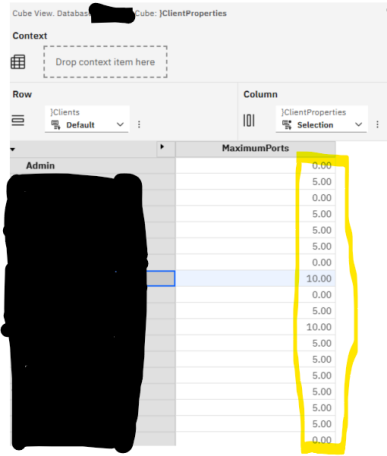
Never negotiate renewal user counts from last year's invoice. Execute a diagnostic TurboIntegrator query against your production TM1 control cubes: inspect }ClientProperties for LastLoginTime and }ClientGroups for assigned permission sets. In enterprise audits across Australian clients, we routinely discover that 15% to 30% of licensed users have not authenticated into the planning server for over 180 days. Prune these accounts before requesting renewal quotes.
Lever 2: Downscaling Casual Approvers to Explorer Status
Review users currently categorized as Contributors. If a regional manager only logs into Planning Analytics Workspace to review a dashboard tile and press an "Approve" button, evaluate whether their workflow can be streamlined via automated workflow triggers or consolidated into an Explorer seat. Downscaling 20 users saves approximately $25,000 AUD each year.
Lever 3: Securing Dual-Run Migration Credits
If you are actively migrating from an on-premise TM1 instance to Planning Analytics SaaS or Cloud Pak for Data, you must run both systems in parallel during validation. Demand contractual dual-run transition credits. IBM Australia regularly authorizes 3 to 6 months of zero-cost overlap licensing to facilitate low-risk cutovers.
Lever 4: Partner Plus Aggregation & Packaging
Purchasing licenses directly through an accredited IBM Gold Partner in Australia frequently yields better commercial packaging than direct sales reps can authorize. Specialized implementation partners can bundle ongoing operational advisory (compare TM1 support models), on-demand DevOps capacity, and training vouchers into the software margin, delivering significantly greater total value per dollar spent.
Frequently Asked Questions
Can we mix and match SaaS user tiers with our existing on-premises TM1 licenses?
No. IBM does not permit commingling SaaS subscription seats with on-premise perpetual instances under a single entitlement. If you operate a hybrid architecture, your on-premise model requires dedicated VPC/PVU and Authorized User licensing, while your cloud environment is contracted separately or transitioned via an IBM Bridge-to-Cloud agreement.
Does IBM Planning Analytics Engine 12 require more VPCs than legacy TM1?
In most scenarios, Engine 12 is more core-efficient because its distributed containerized architecture separates background calculation threads from query rendering. This prevents single large queries from saturating the entire server process and allows smaller baseline core allocations to handle identical multi-user concurrency.
How does Planning Analytics for Excel (PAX) licensing work?
There is no separate license for PAX. Any licensed Modeler, Contributor, or Explorer can install the Planning Analytics for Excel add-in. The user's functional capabilities within Excel (reading dynamic reports vs. writing back cell slices) are governed automatically by their assigned server tier.
Before executing your next IBM contract milestone, benchmark your current user tier breakdown against your verifiable system usage. A rigorous architectural license audit ensures your organization invests in high-performance planning capability rather than idle enterprise software overhead.
Audit Your Planning Analytics Licensing with Octane
Approaching an IBM Passport Advantage renewal or planning an Engine 12 cloud migration in Australia? The team at Octane Software Solutions delivers independent, engineering-led license audits to eliminate ghost seats and optimize your core entitlements.
Book a License & Architecture Audit →If your finance organization is approaching an annual IBM Passport Advantage renewal or planning a modernization from legacy TM1 to IBM Planning Analytics in Australia (see our 2026 software evaluation guide), you have likely encountered the vendor licensing fog. Quoted proposals often bundle expensive full-developer seats for casual departmental reviewers, obscure the differences between cloud-managed pods and core-based VPCs, and present complex acronyms that obscure your actual total cost of ownership. The Commercial Invariant for Finance Leaders Software licenses represent an annuity ...
.webp)







.png?width=573&height=328&name=blog%20(1).png)


.gif?width=600&height=265&name=ezgif.com-optimize%20(1).gif)