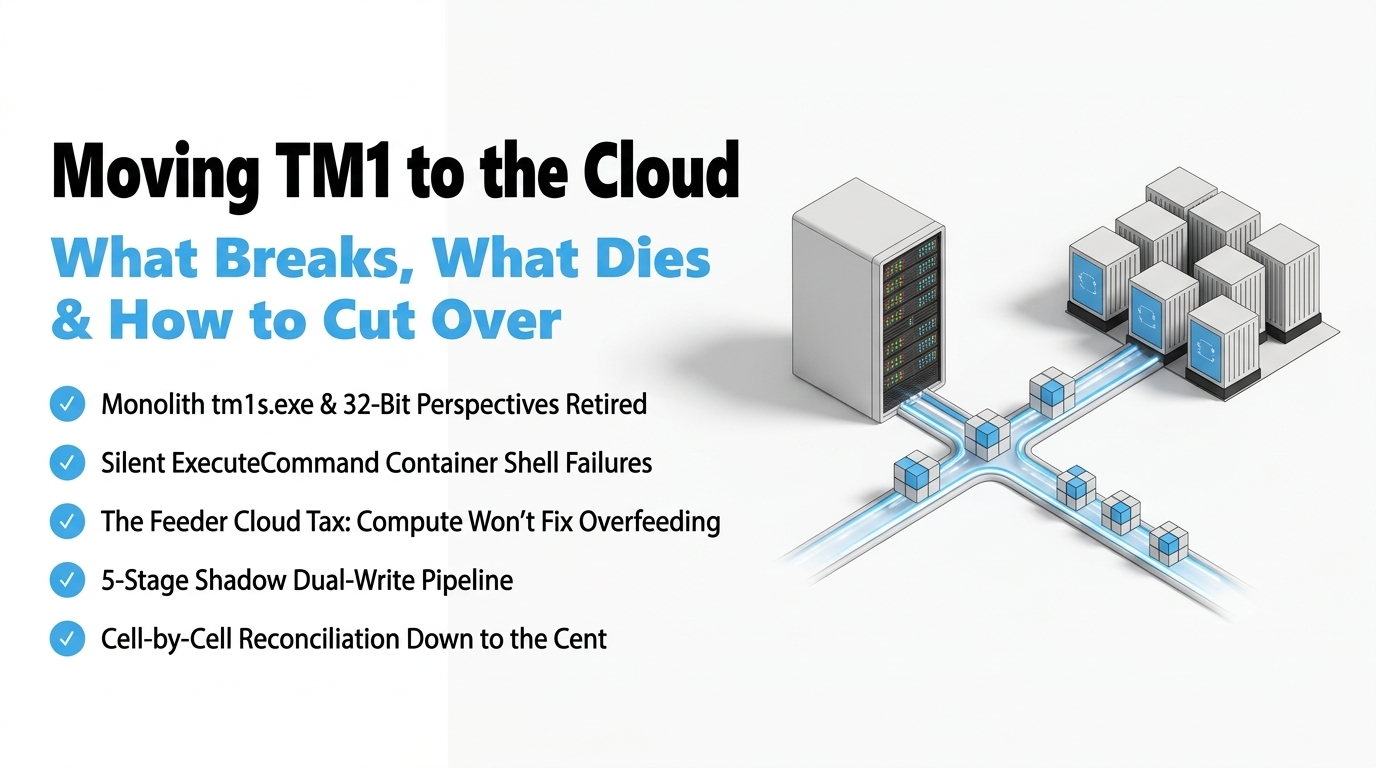
📋 Executive Checklist: What This Playbook Covers
✔
What Dies: Monolith tm1s.exe single-process write locks and 32-bit Perspectives retirement.
✔
What Breaks: Silent ExecuteCommand OS shell failures in secure Linux/OpenShift containers.
✔
The Feeder Cloud Tax: Why cloud memory compute does not forgive unoptimized rule overfeeding.
✔
Zero-Downtime Cutover: The 5-stage shadow dual-write pipeline feeding on-premise and cloud in parallel.
✔
Data Reconciliation Standard: Cell-by-cell parity validation down to 0.00% variance before DNS switchover.
Quick Summary: Let's cut through the marketing noise: nobody building models in the trenches calls it 'Planning Analytics'. We call it TM1. For thirty years, we put up with tm1s.exe because nothing else calculates sparse multidimensional arrays at that speed. But standard support for 2.0.9 is gone, 32-bit tools are dead, and InfoSec is killing unmanaged OS batch scripts. Here is the unvarnished engineering truth about moving TM1 to the cloud: what breaks, what dies, and how to execute a zero-downtime cutover without losing your weekend.
Target Readership: TM1 Architects, Senior Modelers, Financial Systems Admins, and Heads of FP&A.
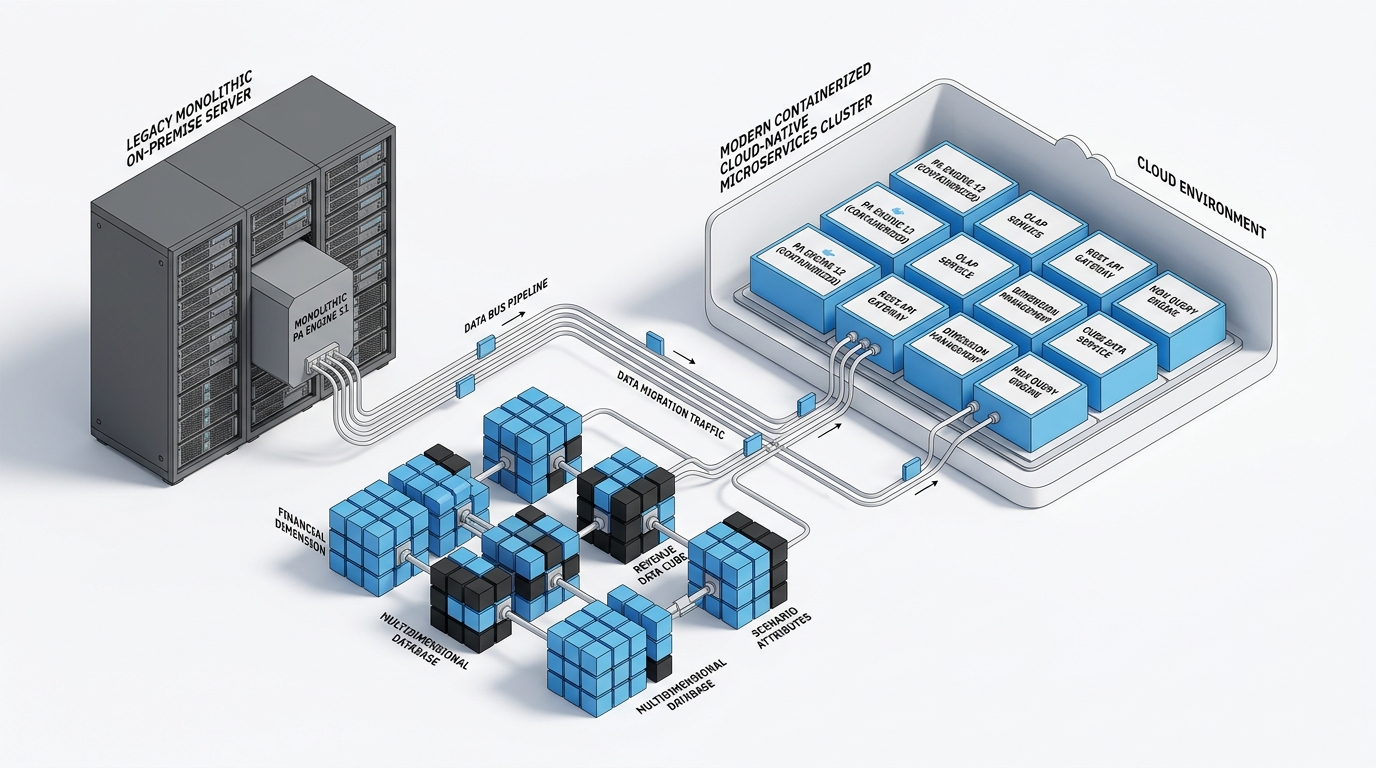
Figure 1: Architectural evolution from legacy monolithic TM1 on-premise servers to containerized IBM Planning Analytics Engine 12 on Red Hat OpenShift.
Let’s be honest: nobody building enterprise models in the trenches calls it "IBM Planning Analytics".
We call it TM1.
And for nearly thirty years, we put up with its operational quirks because nothing else on this planet can calculate complex multidimensional consolidation trees at that speed. When you declare SKIPCHECK; and calculate sparse intersections across twelve dimensions in sub-seconds, the engine is an absolute Ferrari.
What isn’t magic is sitting in front of a remote desktop terminal at 2:00 AM on a Sunday, staring at a frozen command prompt, waiting 45 minutes for a 50GB model to page into RAM from spinning disks while the CFO texts you asking why the Asia-Pac finance team can’t log in for month-end.
We tolerated the memory fragmentation. We used PersistentFeeders=T in tm1s.cfg as our duct-tape solution for fifteen years—praying that the .feeders files wouldn't corrupt and force a four-hour cold boot. We wrote hundreds of fragile Windows batch scripts wrapped inside ExecuteCommand to move flat files around network drives. And we defended 32-bit TM1 Architect and Perspectives like family heirlooms.
Now, standard support for Planning Analytics 2.0.9 is officially dead. Extended support runs out in late 2026. Enterprise InfoSec teams are aggressively purging 32-bit COM add-ins from corporate laptops, and cloud security policies are actively killing unmanaged command-line scripts. Moving TM1 to the cloud is not a routine version upgrade. It is an infrastructure rebuild that strips away thirty years of server-side technical debt. Here is the unvarnished engineering truth about moving TM1 to the cloud: what dies, what breaks, and how to cut over with zero downtime.
1. What Dies: The Legacy Tech Debt IBM Killed Off
To plan a migration, you have to know which parts of your legacy TM1 environment are permanently dead in modern cloud-native architecture:
# The Monolithic Single-Address-Space Bottleneck (Retired in Engine 12)
[Legacy Monolith: tm1s.exe]
┌──────────────────────────────────────────────────────────────┐
│  User Logins & SSL  │  MDX Query Engine  │  TurboIntegrator  │
├──────────────────────────────────────────────────────────────┤
│  In-Memory Cube Storage  │  Rule Evaluation  │  Feeder Flags │
├──────────────────────────────────────────────────────────────┤
│  Disk Persistence: .cub, .dim, .feeders, tm1s.log            │
└──────────────────────────────────────────────────────────────┘
               ▲ Single Address Space / Thread Contention
-
The 30-Year Monolith (
tm1s.exe): All user logins, MDX queries, and calculation threads lived in one process. When an analyst ran a massive un-cached view, TM1 took an IX write lock, freezing all READ threads and locking out concurrent users. In Engine 12, stateless ingress gateways are decoupled from isolated calculation pods on Red Hat OpenShift.
-
32-Bit Tooling (Architect & Perspectives): 32-bit Excel memory limits, Windows 11 enterprise policies, and Office 365 64-bit migrations have officially killed
tm1p.xla. All modeling moves to Planning Analytics Workspace (PAW), and reporting moves to 64-bit Planning Analytics for Microsoft Excel (PAfE).
-
Persistent Feeders (
PersistentFeeders=T): Our 15-year band-aid to prevent 2-hour cold loads is dead. In Engine 12, continuous memory snapshots to cloud object storage (S3/MinIO) hydrate pods in seconds, rendering corrupted .feeders files obsolete.
-
Operating System Batch Scripts (
ExecuteCommand): Linux cloud containers have no Windows cmd.exe. Spawning OS processes is blocked at the container security boundary.
What Dies
On-Premise Monolith (10.2 / 2.0.9)
- Single Process Bottleneck: All logins, queries, rules, and disk I/O compete for CPU threads.
- 45-Minute Restarts: Sequential cold load of raw cube and dimension files off disk.
- Fragile Persistent Feeders: Corrupt
.feeders files force manual deletion and 4-hour reboots.
- OS Shell Scripting: Insecure
ExecuteCommand execution vulnerable to security blocks.
- Vertical Scaling Only: Requires buying massive physical RAM that sits idle 25 days a month.
What Replaces It
Planning Analytics Engine 12
- Stateless Gateways: User logins, SSL, and SAML/OIDC tokens isolated from calculation threads.
- Sub-Second Restarts: Continuous memory snapshots to S3/MinIO hydrate pods instantly.
- Persistent Feeders Obsolete: Native memory hydration eliminates persistent feeder files entirely.
- TLS REST Webhooks: Modern
ExecuteHTTPRequest natively integrated with cloud APIs.
- Elastic Read Replicas: Autoscaling calculation pods absorb peak budgeting concurrency with ease.
2. What Breaks: The Ambushes Waiting for You on Day 1
If you migrate without an architectural audit, here is what will blow up the second your users log in:
Ambush 1: The ExecuteCommand Crash
Any TurboIntegrator chore calling cmd.exe, robocopy, or powershell.exe will fail immediately. In Engine 12 Linux containers, there is no command prompt.
The Fix: Convert all batch scripts to ExecuteHTTPRequest to send authenticated HTTPS POST requests directly to webhooks, serverless functions, or cloud integration buses.
Ambush 2: The Bad Feeder Cloud Tax
Cloud compute scales, but it does not fix bad math. If an on-premise cube has twelve dimensions ordered randomly instead of smallest-sparse to largest-dense, or if rules use blanket overfeeding (['Units'] => ['Revenue'];), you will calculate millions of empty fed cells. In the cloud, RAM costs real money, and overfeeding will trigger out-of-memory container evictions during budget season.
The Fix: Profile }StatsByCube for memory consumption per cell, reorder your dimensions before exporting metadata, and eliminate conditional feeder bottlenecks.
Ambush 3: Hardcoded Local Drive Paths
On-premise TI processes routinely write text logs to hardcoded paths (e.g. D:TM1DataExportsPnlActuals.csv). In Engine 12, there are no local drive letters.
The Fix: Update scripts to use relative paths (e.g. Exports/PnlActuals.csv) which Engine 12 virtualizes into cloud object storage buckets.
Ambush 4: Legacy Perspectives Active Forms
Active Forms relying on custom VBA macros, old Excel 4.0 macro sheets, or 32-bit DLL references fail in 64-bit Excel.
The Fix: Audit your reporting library before cutover and rebuild mission-critical forms as Planning Analytics for Microsoft Excel (PAfE) Dynamic Reports or Custom Reports.
3. How to Cut Over Without Downtime: The 5-Stage Shadow Pipeline
If you try to migrate a global TM1 instance over a single weekend using a "big bang" approach, you are asking for disaster. The only sane way to migrate enterprise models without downtime or data drift is a structured, 5-stage shadow cutover:
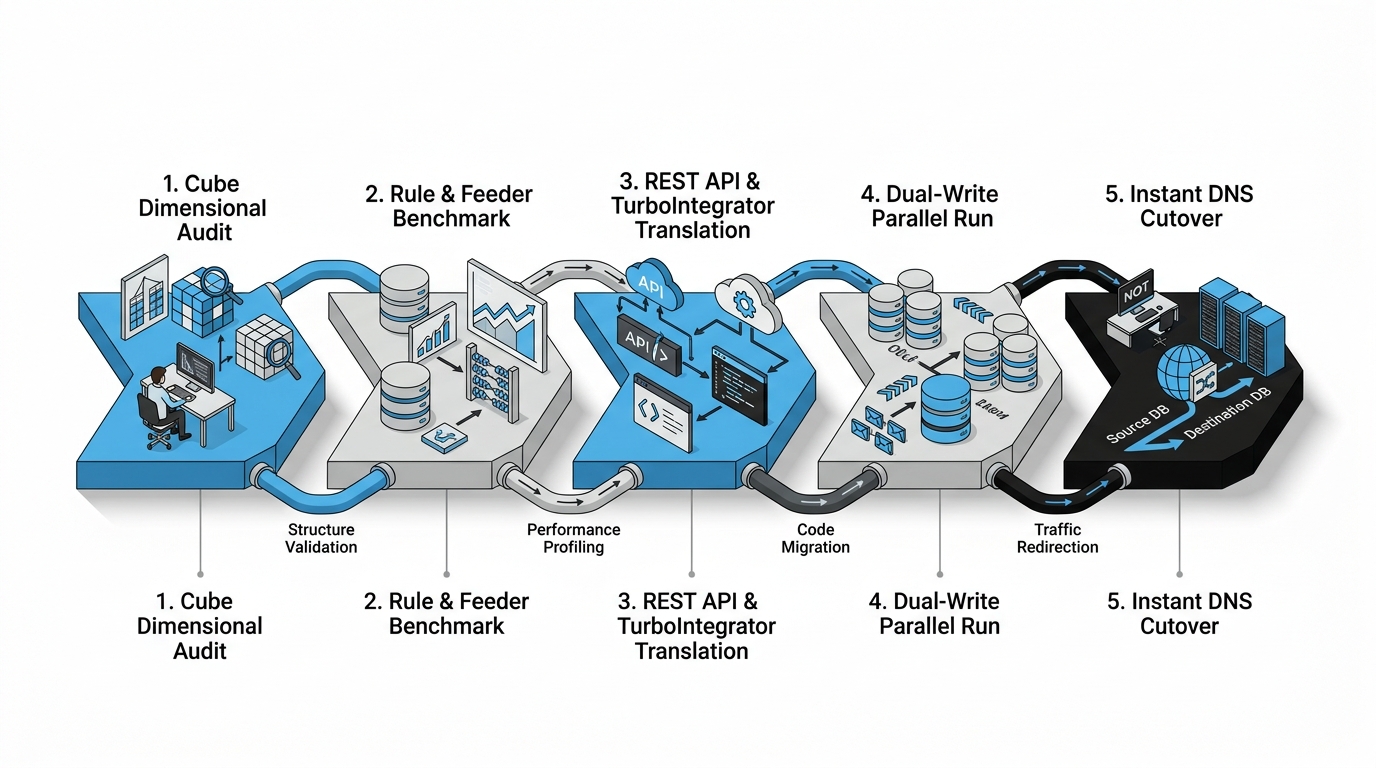
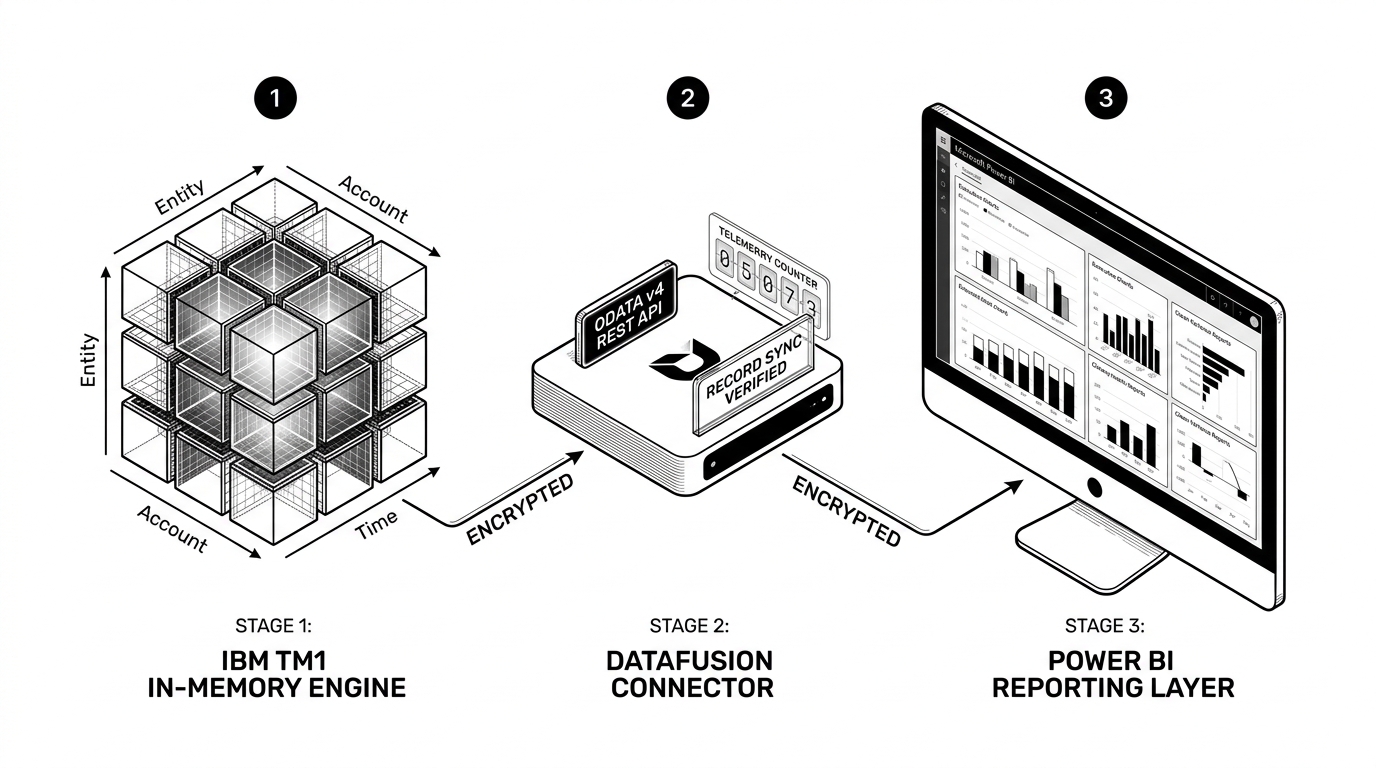
Figure 2: The 5-stage migration cutover pipeline ensuring zero downtime and 100% financial data reconciliation.
1
Stage 1: Cube Sizing & Dimensional Ordering Audit
Profile every cube on your legacy server using }StatsByCube and }CubeProperties. Reorder dimensions so that sparse, dense, and calculation-heavy dimensions follow IBM's memory optimization hierarchy (smallest sparse to largest dense). Purge legacy test cubes and sandbox detritus.
2
Stage 2: Feeder Pruning & Rule Optimization
Audit your rule files (.rux). Eliminate blanket feeder statements and replace them with strict, conditional feeder logic. Verify that all rules calculate under strict SKIPCHECK; enforcement. Resolve feeder bottlenecks before touching the cloud environment.
3
Stage 3: TurboIntegrator Translation to REST APIs
Catalog every .pro file in your data directory. Search for ExecuteCommand calls and replace them with authenticated ExecuteHTTPRequest routines. Update text export directories to use cloud relative paths.
4
Stage 4: The Dual-Write Shadow Pipeline
Deploy your target Engine 12 cluster. Configure your source transactional pipelines to write feeds concurrently to both the legacy on-premise TM1 instance and the new Engine 12 cluster. Run automated reconciliation scripts comparing consolidated P&L balances, trial balances, and headcount numbers daily until variance is 0.00% across three consecutive financial periods.
5
Stage 5: Sub-Second DNS Switchover
When business stakeholders sign off on the reconciliation logs, schedule a calm 15-minute maintenance window—on a Tuesday morning, not at 2:00 AM on Sunday. Update internal DNS records and SAML/OIDC SSO tokens to route users to the new Planning Analytics Workspace ingress gateway. Users resume work on the cloud-native engine without missing a beat.
4. Production TurboIntegrator Code: From Insecure Shells to REST APIs
Here is how a real TM1 architect replaces legacy Windows batch execution with an authenticated, production-grade REST API webhook in Engine 12:
# TM1 TurboIntegrator - Engine 12 Authenticated Webhook Architecture
sApiEndpoint = 'https://api.octanesolutions.com.au/v1/orchestration/model-sync';
sBearerToken = 'Bearer eyJhbGciOiJSUzI1NiIsImtpZCI6Im9jdGFuZS1hdXRoIn0...';

# Build JSON payload with dynamic process metadata
sModelName  = 'GeneralLedger';
sTimestamp  = TIMST(NOW(), '\Y-\m-\d \h:\i:\s');
sPayload    = '{"model":"' | sModelName | '","status":"COMPLETED","updated_at":"' | sTimestamp | '"}';

# Execute TLS-encrypted HTTPS POST directly from calculation core
nHttpStatus = ExecuteHTTPRequest(
    'POST',
    sApiEndpoint,
    '-h Authorization:' | sBearerToken,
    '-h Content-Type:application/json',
    '-d ' | sPayload
);

# Production Error Handling & Observability
IF (nHttpStatus >= 200 & nHttpStatus < 300);
    LogOutput('INFO', 'Successfully delivered sync webhook to cloud bus. HTTP Status: ' | NumberToString(nHttpStatus));
ELSE;
    LogOutput('ERROR', 'Cloud webhook delivery failed. HTTP Status: ' | NumberToString(nHttpStatus));
    ProcessBreak;
ENDIF;
5. Developer-to-Developer FAQ
What happens to tm1s.log and compliance auditing in the cloud?
In Engine 12, transaction logs are not written to an unmanaged local disk file where someone can accidentally delete them. Transaction events are streamed into immutable, encrypted cloud object storage buckets. For regulatory compliance (SOX, APRA), audit logs are permanent, tamper-evident, and queryable via the REST API.
Will our custom MDX queries still work?
Yes, but with one critical improvement: Engine 12 uses a modernized, standards-compliant MDX parser. Complex set expressions (FILTER, GENERATE, TM1SUBSETALL) execute across dedicated multi-threaded calculation workers rather than locking the main server thread.
How do we handle file generation with AsciiOutput when there are no drive letters?
In Engine 12, file paths are virtualized. When you call AsciiOutput('Exports/Actuals.csv', ...), the engine automatically provisions the directory structure inside the managed object storage repository. Files can then be downloaded via the PAW interface or retrieved programmatically through the TM1 REST API (/api/v1/Contents('Files')).
The Architect’s Bottom Line
Migrating off legacy on-premise TM1 isn't about chasing vendor marketing slides. It’s about freeing the world’s fastest multi-dimensional calculation engine from an ancient server architecture that was never designed for modern cloud security, zero-trust networks, or containerized infrastructure.
When you audit your feeders, retire dead shell scripts, modernize your APIs, and run a dual-write shadow cutover, you get the best of both worlds: the raw, sub-second consolidation speed of TM1 paired with sub-second server restarts, zero cold-load downtime, and an architecture that enterprise InfoSec actually approves.
Planning Your TM1 Modernization to Engine 12?
Octane Solutions helps enterprise FP&A and finance technology teams audit legacy TI processes, re-architect feeders, and execute zero-downtime migrations.
Schedule an Architectural Assessment
Migration Checklist
45 Verification Steps
Download the 45-Point TM1 Cloud Cutover Checklist (.pdf)
Planning your cutover to IBM Planning Analytics on AWS? Use our step-by-step checklist to test ODBC drivers, verify REST API endpoints, and ensure zero-downtime execution.
Download the Cutover Checklist →
📋 Executive Checklist: What This Playbook Covers ✔ What Dies: Monolith tm1s.exe single-process write locks and 32-bit Perspectives retirement. ✔ What Breaks: Silent ExecuteCommand OS shell failures in secure Linux/OpenShift containers. ✔ The Feeder Cloud Tax: Why cloud memory compute does not forgive unoptimized rule overfeeding. ✔ Zero-Downtime Cutover: The 5-stage shadow dual-write pipeline feeding on-premise and cloud in parallel. ✔ Data Reconciliation Standard: Cell-by-cell parity validation down to 0.00% variance before DNS switchover. Quick Summary: Let's cut through the marketing ...

.webp) 0
0
.webp) 16 September 2026, 12:59:38 pm AEST
16 September 2026, 12:59:38 pm AEST
.webp) 5 min
5 min
.webp)
.png)






.png?width=573&height=328&name=blog%20(1).png)