.webp) 0
0
.webp) 9 April 2025, 9:00:00 am AEST
9 April 2025, 9:00:00 am AEST
.webp) 5 min
5 min
In a world where speed, scale, and trust define success, Octane has emerged as a leader in enterprise AI-driven transformation. Honoured with the 2025 IBM Partner Plus Award in APAC for automation, Octane’s groundbreaking use of IBM Watsonx Orchestrate is setting a new benchmark for how intelligent automation can empower business users and scale human productivity.
The Award: Increasing performance through automation
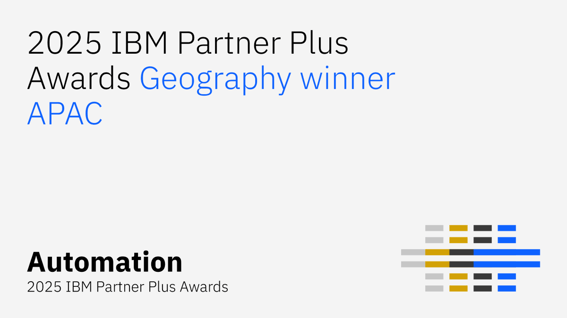
The IBM Partner Plus Award for Automation celebrates business partners who are delivering new levels of performance with speed, scale and security, enabling systems, business processes, and people to be more efficient.
For Octane, this means:
-
Speed: Accelerating workflows by over 70% through AI orchestration.
-
Adaptability: Designing solutions that flex with business demands.
-
Security: Ensuring compliance through enterprise-grade automation guardrails.

“This award reinforces our belief that automation should be intuitive, intelligent, and human-first,” said Amendra Pratap, Managing Director. “Our collaboration with IBM brings this vision to life.”
IBM Watsonx Orchestrate: A new paradigm in intelligent automation
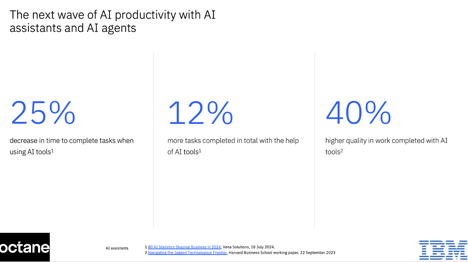
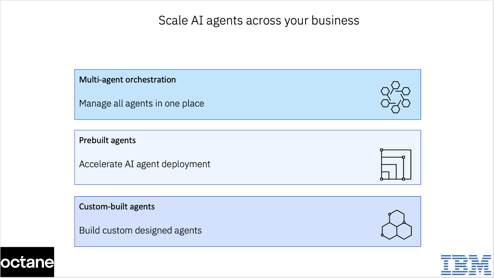
Watsonx Orchestrate is IBM’s enterprise-ready solution that helps create, deploy, and manage AI assistants and agents. It blends AI and workflow automation, enabling users to interact with systems using natural language prompts, representing a powerful step toward fully autonomous agentic AI systems. It enables multi-step, goal-driven task orchestration and integration with existing business systems, connecting to multiple proprietary and third-party AI models and automation tools.
How Octane leverages Watsonx Orchestrate:
- Skill-based AI execution: Prebuilt “skills” automate repetitive actions—like sending emails, updating records, or scheduling interviews.
- No-code integrations: Plug-and-play connections to enterprise tools like SAP, Salesforce, and Workday.
- Conversational interface: Users trigger complex workflows through Slack, Teams, or email with simple prompts.
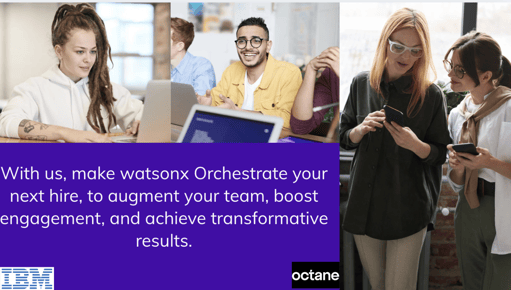
“Watsonx Orchestrate isn’t just for building chatbots—it’s an AI-powered teammate,” says Amendra Pratap, Managing Director, “Watsonx Orchestrate is your next hire. By orchestrating tasks across various assistants, agents and systems, it helps boost workforce efficiency and reduces manual load by surfacing the right tools when you need them."
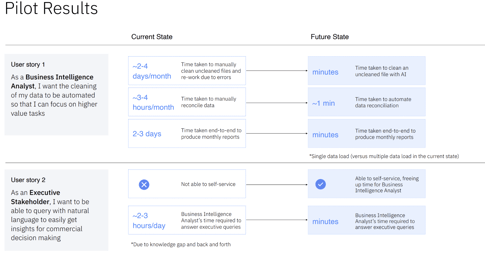
Real-world impact:
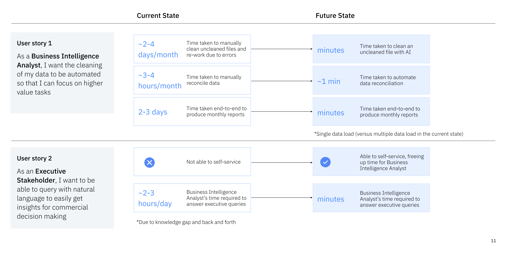
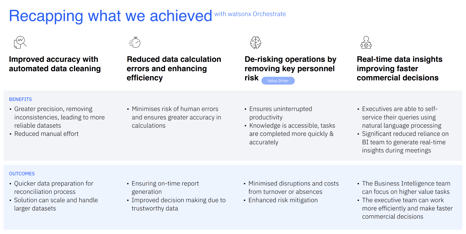
What we achieved:
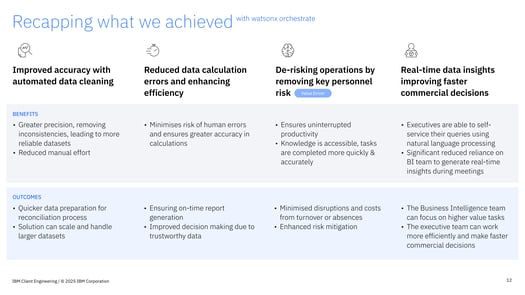
What sets Octane apart: Augmented intelligence, not just automation
Traditional automation follows rules. Octane uses AI to understand goals, context, and next best actions.
With Watsonx Orchestrate, Octane delivers:
- Adaptive workflows: Adjusts based on real-time data (e.g., re-routing approvals during outages).
- Multi-agent collaboration: Skills collaborate (e.g., sentiment analysis + ticket escalation).
- Continuous learning: Models improve from feedback to streamline operations over time.
“We don’t just automate tasks—we augment thinking,” says Steny Sebastian, Principal - Data and AI Platforms. “That’s how we deliver smarter outcomes, not just faster ones.”
Ready to orchestrate intelligence into every workflow?
Explore how Octane’s award-winning AI solutions can help you scale with confidence.
Learn how advanced your organisation is with AI adoption and how Orchestrate can help. - Take the next step. Try IBM Watsonx Orchestrate at no cost, or book a consultation with an expert
Learn more about the IBM Partner Plus Awards: https://www.ibm.com/partnerplus/awards
#AgenticAI #EnterpriseAutomation #OctaneSolutions #WatsonxOrchestrate #IBMPartnerPlus #DigitalTransformation
In a world where speed, scale, and trust define success, Octane has emerged as a leader in enterprise AI-driven transformation. Honoured with the 2025 IBM Partner Plus Award in APAC for automation, Octane’s groundbreaking use of IBM Watsonx Orchestrate is setting a new benchmark for how intelligent automation can empower business users and scale human productivity. The Award: Increasing performance through automation The IBM Partner Plus Award for Automation celebrates business partners who are delivering new levels of performance with speed, scale and security, enabling systems, business ...
.webp)


.png?width=579&height=332&name=AI%20in%20finance%20and%20watsox%20orchestrate%20(2).png)


-1.png?width=457&height=90&name=image%20(2)-1.png)
-3.png?width=513&height=294&name=TM1%20newsletter%20(3)-3.png)

.png?width=435&height=249&name=TM1%20newsletter%20(8).png)




%20(1).jpg "MicrosoftTeams-image (1) (1)")


.jpg "2023-05-30 (2)")
.jpg "2023-05-30 (5)")
.jpg "2023-05-30 (4)")