This article talks about different extensions/files seen in Data directory and how they are co-related to front-end objects that we see in architect. Since, TM1 is an in-memory tool so all objects seen like cube, dimension, TI process etc seen in Architect are saved in data directory with a specific extension and in a specific way to differentiate them from the other objects.
By understanding these extensions/files, it comes easier in finding objects and deciding which objects are needed to be considered to backup or moving a specific set of changes. Consider the case of taking an entire data folder backup which might take up a large amount of space; instead of only a few objects had under gone changes. It would be more efficient to take backup of these changes then the complete data directory.
Also, by understanding these extensions and knowing what information it holds, developers can efficiently decide the objects that needed to be moved and their impact on the system when these objects are moved. To have a better understanding, lets divide the objects seen in TM1 into 3 sections i.e., dimension, cube and TI process & also what files are created in data directory.
Dimension objects
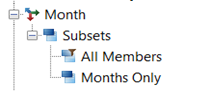
In this section, we will see what files are created in the data directory and what are they related in front-end interface of architect. To have a better understanding of how the dimension objects seen in architect are stored in data directory, we will take example of a dimensions called "Month" with 2 subsets "All Members" and "Months Only"
*.dim File
The dimensions that are seen in Architect are saved in data folder with <DimensionName>.dim extension. The file holds the hierarchy and elements details of that dimension. If the dimension needs to be backup or migrated then we can just take this file. In this example, "Month" dimension seen in architect is saved in "Month.dim" file in the data directory and by reading this file, the architect shows the "Month" dimension and its elements with hierarchy.
|
In Architect
|
In Data Directory
|
 |
 |
*}Subs Folder
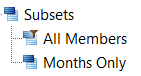
All the Public Subsets that are seen under the dimension in Architect are placed in <DimensionName>}Subs folder respective to that dimension in data folder. In this case, Subsets created for month dimension i.e., "All Members" and "Months Only" are placed in Month}subs Folder
|
In Architect
|
In Data Directory
|
 |

|
*.Sub File
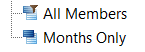
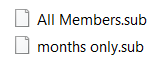
The Subsets are created to make it easier to access the set of elements of a dimension and all the subsets of a any dimension are placed in <DimensionName>}Subs folder with <SubsetName>.Sub extension. The Subsets of Month Dimension i.e., "All Members" and "Months Only" are saved in the "Month}subs" Folder as All Members.sub and Months Only.sub
|
In Architect
|
In Data Directory -> Month}subs
|
|
|
|
Cube Objects
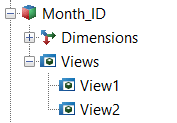
In this section, we will go through the files that are created in data directory for Cube related objects & how are they co-related to the cube objects in the architect. For this case, let’s use the cube "Month_ID" Cube as an example along with its Views "View1" & "View2".
*.Cub File
The cube and data seen in architect of any cube are saved in <CubeName>.cub file in data directory. So, if only the data needs to copied/moved from different environments, we can do this just by replacing this file for that respective cube. Here, Cube "Month_ID" and its data seen in architect are saved in a file Month_ID.cub in data directory of that TM1 server
|
In Architect
|
In Data Directory
|
 |
 |
*}Vues Folder
All the public views seen under the respective cube in architect are saved in <CubeName>}Vues Folder of the data directory. In this case, the views "View1" & "View2" of "Month_ID" Cube are saved in Month_ID}Vues Folder of data directory
|
In Architect
|
In Data Directory
|
 |

|
*.vue file
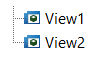
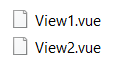
All the public views created under a cube are saved in <CubeName>}Vues Folder with a <ViewName>.vue extension. So, the views "View1" & "View2" are saved in Month_ID}Vues Folder as View1.vue and View2.vue
|
In Architect
|
In Data Directory->Month_ID}vues
|
 |
 |
*.RUX file
This is rule file, all rule statements written in Rule Editor for cube can be seen in <CubeName>.RUX file. Here, Rule statements written in rule editor for "Month_ID" cube are saved in Month_ID.rux file of TM1 data directory.
|
In Architect
|
In Data Directory
|
 |

|
*.blb file
These files are referred as Blob files and they are used to hold the format data, for example if a format is applied inside Rule of a cube then that data is saved in <CubeName>.blb. Similar to this, if a format style is applied to a view then the format details are saved in <CubeName>.<ViewName>.blb file. In this Case, the format style data applied in rule editor for "Month_ID" cube is saved in Month_ID.blb and the Format style applied to the "View1" is saved in Month_ID.View1.blb file which can be found in TM1 Data Directory.
|
In Architect
|
In Data Directory
|
|
Format Style data Applied in Rules
|
 |
|
Format Style applied in View1
|
 |
*.feeders file
This file gets generated only when the Persistent Feeders is set "True" in TM1 Configuration file. Once the feeders have been computed in the system, they will be saved in <CubeName>.feeders and this file will be updated in the feeders. Here, Feeder statements present in Rule editor for "Month_ID" are calculated and are saved as Month_ID.feeders
|
In Architect
|
In Data Directory
|
|
Feeders statements in Rule for Month_ID Cube
|
 |
TI and Chore Objects
Here, we are going to look at files that are created in data directory for TI processes and chores.
*.Pro file
All TI processes in the Architect are saved in data folder with <TIProcessName>.Pro extension. Now, assume that there is TI process "Month_Dimension_Update" seen in architect then this TI process is saved as Month_Dimension_Update.pro file in data directory.
|
In Architect
|
In Data Directory
|
 |
 |
*.Cho file
The chore which is used to schedule the TI process is saved in the data folder with <ChoreName>.cho extension. Say, we have to schedule the TI process "Month_Dimension_Update" so we create a chore, "Month_Dim_Update" and this will create a file Month_Dim_Update.cho
|
In Architect
|
In Data Directory
|
 |
 |
Application objects
Applications provide the functionality to create virtual folders and this helps in accessing and the orderly sorting of TM1 objects like dimensions, TI Process, Views, Excel reports and so on. When any TM1 Object is added in the Application folder/Virtual folder, it creates a shortcut for that object enabling us to access the object from the shortcut and we can also rename these shortcuts as required.
When these objects are added, in turn they create a file in }Applications Folder of datafiles. These files hold the object information like type, name, reference and so on. Let’s take example of test virtual folder below Application
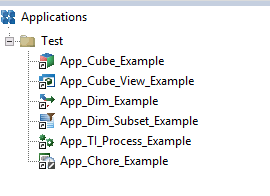
You can find these objects in datafiles Folder > }Applications Folder > Test Folder

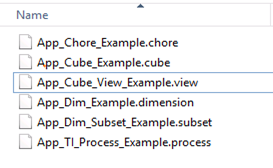
You can find table on how the objects are mapped from frontend architect to backend files in the data folder
|
Objects in TM1 Application
|
Object Type
|
Files create in Application Folder of Data Directory
|
|
Test
|
Virtual Folder
|
Test Folder
|
|
App_Cube_Example
|
Cube
|
App_Cube_Example.cube
|
|
App_Cube_View_Example
|
View
|
App_Cube_View_Example.view
|
|
App_Dim_Example
|
Dimension
|
App_Dim_Example.dimension
|
|
App_Dim_Subset_Example
|
Subset
|
App_Dim_Subset_Example.subset
|
|
App_TI_Process_Example
|
TI process
|
App_TI_Process_Example.process
|
|
App_Chore_Example
|
Chore
|
App_Chore_Example.chore
|
You can also add files, URLs and Excel files from the system to the TM1 Application Folder. When we add files like text file, excel file in TM1 Application folder, *.blob files are created in backend of }Applications Folder in data directory. Similarly, *.extr file is created for URL and this file is saved in the TM1 Application Folder.
Also, if we had selected “copy the file to the TM1 Server” then the copy of that file gets saved in the }External Folder of Data Directory . Similarly, When the report is created and upload from Perspective client of TM1 it creates *.blob File and places the file in the }External Folder.
This article talks about different extensions/files seen in Data directory and how they are co-related to front-end objects that we see in architect. Since, TM1 is an in-memory tool so all objects seen like cube, dimension, TI process etc seen in Architect are saved in data directory with a specific extension and in a specific way to differentiate them from the other objects. By understanding these extensions/files, it comes easier in finding objects and deciding which objects are needed to be considered to backup or moving a specific set of changes. Consider the case of taking an entire data ...

.webp) 0
0
.webp) 17 March 2020, 7:40:00 am AEDT
17 March 2020, 7:40:00 am AEDT
.webp) 3 min
3 min
.svg)
.webp)









.webp)