 0
0
 6 August 2020, 12:00:00 am AEST
 3 min
3 min

 0
6 August 2020, 12:00:00 am AEST
3 min
0
6 August 2020, 12:00:00 am AEST
3 min

We might often get a request from users that TM1 session has logged. As per the client requirement and standards, need to increase or decrease the session timeout. Changing the session timeout is a trade-off, it should not be too big or too small. If it’s too big then many ...
We might often get a request from users that TM1 session has logged. As per the client requirement and standards, need to increase or decrease the session timeout. Changing the session timeout is a trade-off, it should not be too big or too small. If it’s too big then many inactive sessions can lead to server performance issues. If it is too small, then the user experience might be affected.
Each application of TM1 has its separate session timeout parameter. Jump into the respective section, depending upon your need.
TM1Web
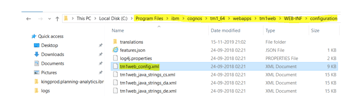
1. Go to <Installation Folder>\IBM\cognos\tm1_64\webapps\tm1web\WEB-INF\configuration and Open tm1web_config.xml file.
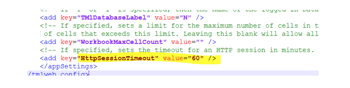
2. Change the HttpSessionTimeout to desired value.
a. Please note timeout value to be mentioned in minutes
3. Save and close the tm1web_config.xml file.
4. Restart the IBM TM1 Application Server service.
PAX
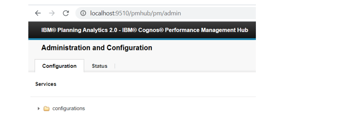
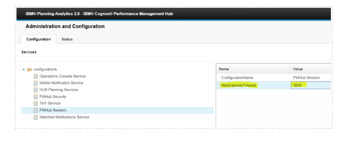
2. Sign-in using your credential at top right corner.
3. Expand Configurations and go to PMHub Session.
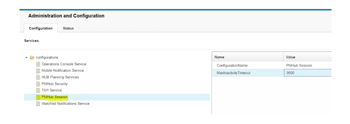
4. Change MaxInactivity Timeout value. Default value is 3600 sec.
PAW
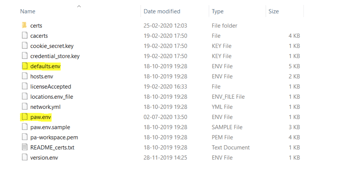
1. Go to <PAW Installation Folder>\paw\config and open paw.env and defaults.env file.
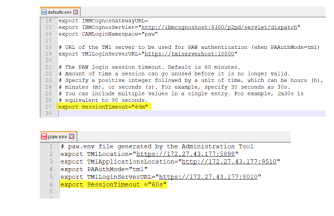
2. Copy “export SessionTimeout” parameter from defaults.env file and add it to paw.env file with desired value and save.


Rajan is an Experienced Software Engineer with 4+ years of experience working on IBM Cognos TM1. He is also a former TM1 consultant in Octane for 2 years and 1 month
 print
print


Leave a comment